
Wordpress as a documentation tool
Wordpress is a wonderful blogging engine but did you know that it's also the perfect tool for writing and publishing software documentation? Well, it can be, with a couple of plugins, that is!
First off, take a look at the SWX documentation and notice how it's made up of several pages and each page is divided into topics that can each have comments attached to them.
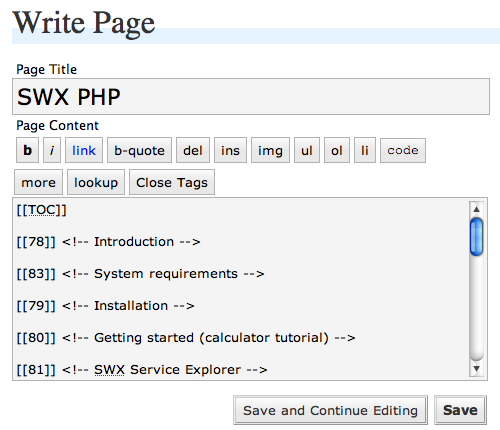
Wordpress Pages normally contain only static content but the pages in the SWX documentation are a collection of posts, strung together by their post ids using a plugin I wrote called Inline Posts.
I'm a big fan of the PHP documentation and I find the comments there (e.g.) as useful as, if not more useful sometimes, than the original documentation content itself. So, when creating my own documentation system, I wanted to mirror the ability to add granular comments at the topic-level.
Also, using the Inline Posts plugin, it's very easy to create an automatic table of contents for a page, based on the titles of the posts that make up the page.
By using posts in this manner (as topics), you retain the granularity of your learning materials (and can re-use them in different ways). It also gives you the ability to re-order your topics by simply rearranging the order of the post ids.
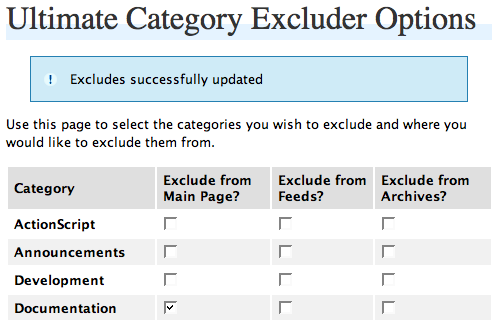
When using posts as topics in documentation pages, you will most likely not want them also showing up on the front page of your blog. To stop them from doing so, put all those posts in a category (e.g., "Documentation"), and then exclude that category from your front page using the Ultimate Category Excluder plugin.
Of course, once you've created your documentation, you will most likely want it to show up in Wordpress searches, which it won't do by default. Another plugin, Search Pages 2.0, lets you do just this.
I hope that this article has shown you that Wordpress can be a powerful tool for writing and publishing online documentation.
Check out the SWX documentation for an example of what's possible using Wordpress and the three plugins mentioned in this post.
Comments
by libby on 2007-09-14 01:39:01
by Jim Priest on 2007-09-05 16:53:12
by Bruce on 2007-09-09 16:24:59
by wiertnice on 2007-11-15 17:26:28
by David Stembridge on 2007-11-05 23:08:23
by Business And Ideas on 2008-01-24 01:38:33
by Vince on 2009-09-01 21:11:12
by MrChews4Health on 2009-11-20 18:08:02
by mathhattan on 2010-05-18 15:00:02
by ugg boots on 2010-12-14 03:50:45
by Luke Moulton on 2010-11-25 03:52:36