
Inline Posts Plugin for Wordpress
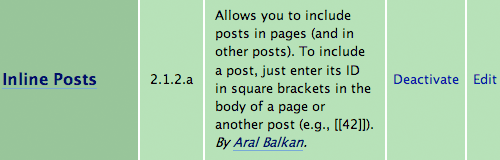
Wordpress lets you create pages that contain static content. The Talks and About pages on this blog are two examples. Unfortunately, until now you could not include posts inside of these static pages. With my new Inline Posts Wordpress Plugin (version 2.1.2g) (2KB), you can!
See the SWX Showcase and SWX documentation pages on swxformat.org for an example of the plugin in use.
In a nutshell
Download and install the plugin and you can include posts in pages (and other posts) by entering the Post ID surrounded by double square brackets ([[nnnn]] where nnnn is the numeric ID of the post you want to include).
Why include posts in pages?
The ability to include posts in pages is something I've felt the need for several times in the past. Basically, the idea is to use posts as sections within a page, with the post title appearing as the section header.
Most recently, I wanted to create the SWX documentation for the SWX homepage as a series of blog posts. This way, each section could have comments on it and I could easily update a single section by editing a post and change the order of sections on the page by changing the order of simple tags that correspond to the posts. I could also show atomic last-modified info for each section so it would be immediately obvious if any sections drift woefully out of date (something that can easily happen to long pieces of documentation).
Since this functionality didn't exist (and believe me, I searched far and wide on the Internets), I decided to roll up my sleeves and try my hand at creating my first Wordpress plugin. It was not a difficult process once I tracked down the hook I needed to latch onto and blew the relearned regular expressions for the umpteenth time.
Installation
- Download the Inline Posts Wordpress Plugin (version 2.1.2g (2KB) and unzip it into your wp-content/plugins/ folder.
- Log into your Wordpress administration panel, click the Plugins tab, and click the Activate link for the Inline Posts plugin.
Using
- Start writing a new page (or edit an existing page)
- In the place on the page where you want to include a post, enter the ID of the post, surrounded by double square brackets in the form [[nnn]].
That's it! :)
You can also include posts in other posts using this method (though I'm not entirely sure why you would want to!) And, since pages are really just posts (confused yet?), you can use the Page ID to include a page in a post or a page in another page too if you really feel like that will make your life better! :)
To see an example of it in use, look at the Wordpress page on this blog as you will see this post included in it. Note that this is the first version of the plugin and I'm testing it out as I go. It's only been tested (and not much, at that) on Wordpress 2.1.2. I've tested it on 2.1.2, 2.3.x, and it's running well on 2.5. That said, use at your own risk! :)
I hope this plugin will be as useful for you as it has been for me.
Related plugins
If you'd like your wonderful new pages to show up in searches, install the Search Pages 2.0 plugin. The two plugins work together well but you will get included posts returned as well as the pages in which they are included (which is expected behavior). Even if your pages are entirely made up of posts, having them show up in searches within the context of the page is still useful.
Finally, you may not want the posts that you include in pages to appear on the front page of your blog (or perhaps, not even in your site's feed or in the archives). You can exclude inline posts from these places by using the Ultimate Category Excluder (UCE) by Kyle Slattery. Install this plugin and then put all the posts that you don't want to appear on the main page in a separate category (on SWXFormat.org, I chose "Documentation" as the category to exclude). Then, in the Options panel for UCE, check the "Exclude from Main Page?" option next to that category.
Known issues
For some reason the number of comments on a post is not displaying correctly on Wordpress 2.0.2 (on this blog). It does display correctly with 2.1.2.
Changelist
- Version 2.1.2g: (August 28, 2007) Added automatic table of contents (TOC) creation for pages. If you want the TOC included in a page, use the tag [[ TOC ]] (without the spaces). Also added Top anchor links for easy navigation from TOC to topics and back.
- Version 2.1.2f: (August 27, 2007) Anchor tags are now added to topic headings so you can link to specific topics on a page in the form: http://myblog.com/somepage/#post_id as in the following example: http://swxformat.org/documentation/#85).
- Version 2.1.2e: (August 25, 2007) The plugin now removes HTML comments and the linebreak before the initial double bracket so that these don't cause Wordpress to display additional <br /> tags in the output.
- Version 2.1.2d: (August 25, 2007) Raised priority of the plugin so that it doesn't conflict with other plugins like the CodeHighlighter plugin. Also removed an error_log trace that would have resulted in large log files (the plugin no longer outputs any debug information).
- Version 2.1.2c: (August 24, 2007) Added "Edit Topic" links so you can edit an included post in a page without having to click through to that post first.
- Version 2.1.2b: Added admin panel and option to set the tag that the titles of posts are displayed in (h2, h3, etc.)
- Version 2.1.2a: Changed default tag to [[nnn]] from [nnn].
- Version 2.1.2: First release.
License
The Inline Posts Wordpress Plugin is released under the open source MIT license.
Comments
by Aral on 2007-08-23 06:07:19
by Linkguides, lidt wp og mærkelige mennesker | Webmercial.dk on 2007-08-30 09:57:36
by Nancy Gill on 2007-08-22 14:21:44
by Aral on 2007-08-22 14:25:23
by Olly on 2007-08-22 14:39:21
by Aral on 2007-08-22 15:20:37
by Aral on 2007-08-22 15:21:15
by Olly on 2007-08-22 15:40:50
by Jeff on 2007-08-22 20:33:20
by zeflasher on 2007-08-24 01:41:44
by SWX documentation updated at Aral Balkan on 2007-08-25 17:51:22
simpletonscustomers.by steve on 2007-08-27 13:42:19
by Auto-TOC generation for Inline Posts Wordpress Plugin at Aral Balkan on 2007-08-28 15:12:34
by Bruce on 2007-08-29 03:48:42
by minal on 2007-08-31 12:04:03
by Aral on 2007-08-31 13:33:27
by Craig on 2007-09-02 04:26:36
by Aral on 2007-09-02 08:29:10
by payjisan on 2007-09-19 00:06:12
by Trevor on 2007-09-04 16:10:43
$postTitleText = "<$titleTag>$linkToPost$postTitle$anchorTag</a></$titleTag>";To fix it up, drop another </a> tag in after "$postTitle":$postTitleText = "<$titleTag>$linkToPost$postTitle</a>$anchorTag</a></$titleTag>";A little cleaner than my previous effort.by Lars H on 2007-09-19 17:31:16
by Ronny on 2007-09-19 22:51:40
by Aral on 2007-09-05 11:33:41
by minal on 2007-09-05 05:40:34
by Aral on 2007-09-05 12:35:53
by Wordpress as a documentation tool at Aral Balkan on 2007-09-05 13:08:30
by Neil on 2007-09-06 00:14:39
by Aral on 2007-09-06 08:33:55
by Rodrigo Rutkoski Rodrigues on 2007-09-06 18:19:29
by Aral on 2007-09-06 22:17:50
by Dali on 2007-09-07 04:57:49
by Teri on 2007-09-07 06:32:27
by Aral on 2007-09-24 21:33:10
by XirBIT Blog » ลืมรหัสผ่าน Admin และปลั๊กอินอื่น ๆ on 2007-09-14 06:46:20
''.$lastModifiedText.' '.$commentsText.'. '.$topLink.'. '.$editLink."".That left me with an open "a" tag (following an "a name=" tag), so I added the editLink and the topLink back in below the comment:''.$topLink.''.$editLink."".Not very elegant, and it doesn't strip out all the metadata (Top is still there), but it does get rid of most of itby Lars H on 2007-09-19 16:57:08
by Aral on 2007-09-21 15:35:46
by Inline Posts en Categorieën (Powered by Aral Balkan) - noCreativity.com on 2007-09-24 19:09:11
by Ronny on 2007-09-24 19:14:29
by greekvisualarts on 2007-09-30 20:05:24
by Aral on 2007-10-01 02:55:02
by Just Flashing - Today’s Top Blog Posts on Flash - Powered by SocialRank on 2007-10-01 09:02:31
by malin on 2007-10-02 11:35:40
by Interesting websites for SEO, Web Marketing and everday work from Sante - October 4th on 2007-10-05 00:32:11
by WordPress Candy » Inline Posts Plugin on 2007-10-10 18:52:55
by Martijn on 2007-10-11 12:49:38
by Aral on 2007-10-11 18:47:46
by Martijn on 2007-10-13 15:59:10
by ego2012 on 2007-12-14 13:08:47
by Michael Cromarty on 2007-10-16 11:58:48
by Aral on 2007-10-16 12:48:21
by Michael Cromarty on 2007-10-16 18:23:32
by Mike on 2007-10-17 14:19:26
by Mike on 2007-10-17 14:22:30
by Mark Pagliaro on 2007-10-19 01:16:32
by PB on 2008-01-02 14:06:12
by Dave on 2007-10-21 23:57:14
by Aral on 2007-10-22 13:13:44
by Aral on 2007-11-10 22:40:17
by Jonah on 2007-12-11 04:13:22
by David Stembridge on 2007-11-26 15:01:39
by Adam on 2007-10-28 03:33:47
by Tom Johnson on 2007-12-27 07:22:09
by Esha on 2007-11-27 17:16:56
by Belinda on 2008-04-10 09:59:59
by Rachel on 2008-01-27 18:38:27
by Dov on 2008-01-28 18:20:49
by Elzebore on 2007-10-30 21:23:05
by Inferis’ Mind Dump » Blog Archive » links for 2007-10-30 on 2007-10-30 22:27:24
by links for 2007-10-31 : 7 seconden on 2007-10-31 01:22:13
by David Stembridge on 2007-11-15 04:02:58
by How2: Publish to a new Navigation Tab (or Page) in Wordpress 2.5.1 | TYsTips.com - Improving your blogging experience. on 2008-12-19 03:35:59
by Paluxus on 2008-06-13 12:43:15
by barry.b on 2008-01-14 13:09:18
by Massimiliano Margarone on 2007-12-02 06:15:11
by Jeremy on 2008-03-16 09:36:48
by Conrad on 2008-09-14 01:24:58
by Jonah on 2007-12-02 19:42:26
$posts = get_posts("category=$catId");To this:$posts = get_posts("category=$catId&numberposts=3");I just added &numerposts=3 to the get_posts function. You could change 3 to any other number. This is just the regular WP get_posts() function and you can use all the other arguments too! Cheers, Jonahby Jonah on 2007-12-02 19:50:38
by شات on 2008-06-16 06:01:04
by al-zaytun on 2008-07-17 11:59:35
by Darren on 2008-09-29 23:33:03
by Mike Tosetto on 2008-07-31 23:37:18
by Aral on 2008-01-20 11:07:07
by Aral on 2008-01-19 09:01:33
by Marko on 2008-01-19 13:34:10
by Rachel on 2008-03-04 21:43:59
by Julie on 2008-09-15 19:49:58
by Ben Kreunen on 2008-02-04 00:00:55
by David Stembridge on 2007-11-05 23:51:02
by David Stembridge on 2007-11-05 23:57:01
by Rich on 2008-10-01 16:54:46
by Roy Sencio on 2008-05-05 16:28:29
by Matt on 2008-06-04 07:53:47
by John on 2008-06-09 18:52:34
by TheA_rtist on 2008-08-04 09:21:07
by WASIM on 2008-06-05 21:50:45
by millAh on 2008-03-11 20:46:10
by Matt Simpson on 2008-04-05 16:39:17
by David Stembridge on 2007-11-24 03:55:07
by Sean on 2008-01-24 07:18:37
by Steve Mooradian on 2008-05-08 18:51:24
by Massimiliano Margarone on 2007-11-25 12:33:09
by Massimiliano Margarone on 2007-11-25 12:37:19
by TheFrankFactor on 2008-04-10 00:59:05
by Massimiliano Margarone on 2007-11-25 16:21:24
       <h2 id="post-"></h2>


       ', ''); ?>
I thought that the_content() the way it's used here allows me to use "more" but it's not working and I have no clue why. Does anyone have any suggestions? Thanks so much! Rachel Aral: One suggestions about the plug-in - you might want to consider including a footer that's automatically added to a page that's using your plug-in that gives you credit... I've manually added that to my page...by Rachel on 2008-01-27 18:30:58
by walter on 2007-11-29 03:30:02
by TheDark on 2007-12-22 22:55:34
by Trevor on 2008-06-06 20:49:15
by Tom on 2008-02-21 15:24:40
by Matt on 2008-09-10 21:06:14
by KingPin on 2008-04-06 23:51:07
by Sandra on 2008-06-06 01:18:33
by JoNathan on 2008-01-23 02:38:52
by Eric Bunde on 2007-12-09 17:38:49
by rolando on 2009-01-05 04:29:53
by Bhooshan on 2008-01-24 06:57:10
by Fash on 2008-07-08 21:34:34
by TheFrankFactor on 2008-04-10 00:37:00
by Rachel on 2008-01-26 05:53:23
by bedava sitem on 2008-07-25 00:38:38
by Ryan on 2008-03-12 17:15:26
	<h2 id="post-">


	<?php edit_post_link(__('Edit'), '', ''); ?>
by Rachel on 2008-01-27 18:33:11
by communicatrix on 2008-01-27 19:57:42
by GTechTime on 2008-03-14 13:22:21
by Andrew Trench on 2008-07-24 13:53:15
by Saha on 2008-01-30 12:42:58
tags to every post. This was creating some extra space in my posts, so I changed this line in the file:$content = ''.$content;to this:$content = ''.$content;Then I made a display: none entry for the class "hidden" in my css file. Has anyone else noticed this problem?by Jeremy on 2008-03-16 08:28:23
by Jeremy on 2008-03-16 08:30:12
by pastcaring on 2008-08-11 13:14:35
by Dawnne on 2008-02-16 16:38:56
by Aral on 2008-01-23 18:09:48
by Simon on 2009-01-09 04:01:43
by Jenny on 2008-06-03 14:33:39
by lincoln on 2008-10-08 17:24:37
by millAh on 2008-03-11 16:02:20
by Mike Hill on 2008-07-26 03:55:37
by Thomas on 2008-07-11 09:07:26
by Ryan on 2008-03-12 17:17:30
by Luke on 2008-04-11 20:39:54
by valerie on 2008-11-16 21:11:57
by valerie on 2008-11-16 21:10:15
by sean on 2008-05-12 01:50:36
by Morgan on 2008-06-28 02:59:34
by Rachel on 2008-01-29 03:19:35
by Ed Willard on 2008-06-28 19:34:36
by Kristen on 2008-08-13 04:29:42
by Paluxus on 2008-06-13 12:52:28
by Ed Willard on 2008-06-28 20:28:07
by Rachel on 2008-06-29 17:56:47
by Aral on 2008-05-01 07:45:14
by Jukka on 2009-01-27 14:39:25
by Aral on 2008-01-30 11:58:27
by maser on 2008-07-20 10:26:27
by maser on 2008-07-20 10:33:36
by Charley Ramm on 2008-04-30 22:29:44
by apad on 2008-01-19 06:57:56
by kevin on 2008-01-19 09:10:37
by had on 2008-11-02 17:57:15
by Ben Kreunen on 2008-02-04 00:04:48
by Connor on 2008-03-05 04:00:28
by Nathan on 2008-01-20 23:27:47
by John Michael on 2008-03-23 14:30:49
by Chris on 2008-04-24 23:18:49
by Chuck Michaelis on 2008-10-27 15:36:25
by John Nash on 2008-07-06 16:49:18
by helmeloh on 2008-07-21 23:05:29
by michael on 2008-10-24 15:46:44
by livio on 2008-05-27 18:05:09
by GTechTime on 2008-03-14 12:54:53
by Nadine on 2008-08-15 12:36:47
by Nadine on 2008-08-15 12:39:31
by Groovemeister on 2008-07-02 22:34:45
by Filipe Abreu on 2008-08-02 16:00:52
by murtaza on 2009-01-03 11:39:41
by thierry on 2008-11-19 17:38:21
by Alper on 2009-04-20 02:56:32
by valerie on 2008-11-16 21:11:19
by mindy on 2008-05-15 14:53:51
by flibbertigibberish.com on 2009-01-02 05:42:12
by alfi on 2008-07-17 11:40:34
by Taira on 2008-08-13 19:55:39
by count on 2008-12-17 05:29:23
by test on 2008-10-07 23:47:23
by tore on 2008-09-08 11:36:39
by Nora on 2008-11-26 11:44:47
by Jim Freeman on 2009-02-04 20:27:02
by Robsku on 2008-12-18 15:31:50
by Barbara Jean Walsh on 2008-11-01 21:47:29
by Barbara Jean Walsh on 2008-10-23 18:08:53
by How2: Publish a Post to a New Page Without Posting to Your Main Home Page in WordPress 2.5.1 | TYsTips.com - Improving your blogging experience. on 2008-12-20 00:49:10
by mugger on 2008-10-20 22:21:10
by mugger on 2008-10-20 22:31:59
by mugger on 2008-10-21 16:19:36
by Rob on 2008-09-12 15:49:25
by lida on 2008-10-13 09:21:46
by Shari on 2008-11-23 17:15:44
by Angie on 2009-02-12 15:05:42
by Steve Cousino on 2008-12-14 23:53:51
by Prez on 2009-01-29 19:47:51
by Meyolito on 2009-01-06 15:41:04
by hitesh bagai » checking …. Multiple posts inside the new Page on 2009-01-06 06:42:27
by mike g on 2008-12-17 01:35:17
by darren bulhak on 2009-02-15 22:05:06
by Michael on 2009-01-21 22:57:09
by Jason on 2009-02-06 00:36:27
by Darren on 2009-02-26 22:58:28
by Jake on 2009-02-11 22:57:46
by fretbuzz on 2009-03-30 18:49:40
by fretbuzz on 2009-03-31 01:28:06
by Antonio on 2009-06-14 18:38:27
by damon on 2009-01-15 17:05:35
by Tim Holt on 2009-02-16 17:02:46
tag (specifically,), and it turned out to be Inline Posts that was causing it. Line 146 of the plugin file needs changing from$content = ''.$content;to$content = ''.$content;. - Timby Tim Holt on 2009-02-16 17:00:55
by ahmed on 2009-06-08 17:31:38
by Kyle Otterbein on 2009-01-21 17:28:00
by Rutkoski on 2009-02-12 18:55:14
by Cas client : association Germaine Tillion | Soluo, création de site Internet et intranets métier on 2009-02-16 22:32:26
by Chuck on 2009-02-17 01:22:05
by Mike T. on 2009-06-23 15:30:51
by Dennis on 2009-05-23 16:09:09
by Jamie on 2009-04-27 13:27:15
by bilbob on 2009-04-12 14:14:04
by Erio on 2009-06-09 19:38:01
by Sofia on 2009-04-15 23:26:55
by Wordpress Pluggin to pull Posts and Category in a page | Kaustubh Verma on 2009-04-17 10:15:46
by Inline Post Plugin Review | Welcome To Bilbob's World on 2009-04-03 00:08:29
by Opa on 2009-04-03 18:08:33
by jonnieKING on 2009-05-19 21:07:09
by Carlo on 2009-10-13 23:21:06
by منتديات on 2009-06-16 17:13:22
by غلا on 2009-06-16 17:14:40
by توبيكات on 2009-06-16 17:15:19
by توبيكات رومنسيه on 2009-06-16 17:15:58
by Bob on 2009-07-03 17:05:36
by Gabrielle on 2009-06-20 09:29:21
by WordPress Plugins for Writers. | notagrouch.com on 2009-07-22 21:10:28
by Wordpress Plugin: Inline Posts on 2009-06-25 06:30:08
by miranda on 2009-09-24 13:12:49
by Christian Sisson on 2009-09-19 06:02:32
by Anthony on 2009-10-04 15:53:31
by Cm Site tutorial » הטמעה של Page/post ב page/post on 2009-07-10 21:20:46
by Kjell R. Kjørstads Blog » The irony of blog.perldev.org on 2009-07-12 01:41:52
by Jeremy on 2009-10-31 05:05:55
by Leah on 2009-09-09 06:24:36
by mugger on 2009-09-28 22:07:24
by G on 2009-09-12 07:00:13
by Heather on 2009-08-15 14:45:41
by Altın Fiyatları, Günlük Altın Fiyatları, Çeyrek Altın Fiyatları, Yarım Altın Fiyatları, Cumhuriyet Altını Fiyatları, Altın Borsası on 2009-09-04 08:01:03
by Post In Wordpress Pages | Mega Champ on 2009-10-17 14:52:28
by Martin Koster on 2009-10-05 13:05:11
by wedding songs on 2009-10-06 16:23:17
by Aral Balkan – Inline Posts Plugin for Wordpress on 2009-08-23 05:18:57
by Sports Picks on 2009-10-15 18:35:52
by Heather on 2009-08-18 20:25:57
by Phil on 2009-10-06 11:35:48
by claudio on 2009-11-11 17:44:41
by shadowchaser on 2009-11-12 08:29:34
$text = $postBodyText;by Krinkle on 2009-11-01 00:18:40
			//$text = $postTitleText.''.$lastModifiedText.' '.$commentsText.'. '.$editLink."".$postBodyText;
			$text = $postBodyText;
by Krinkle on 2009-11-01 00:19:08
by Janet Siefert on 2009-11-04 03:57:19
by ilse on 2010-03-10 18:51:53
by Danny on 2009-11-27 21:43:00
by koko on 2009-11-30 05:25:21
by Marvin on 2009-11-16 02:12:31
by Daan on 2009-12-18 20:34:57
by DSQ on 2010-01-10 15:48:10
by Andrea on 2009-12-16 01:42:53
by Daan on 2009-12-18 20:46:31
by Raposo on 2009-12-19 02:14:23
by birgitte on 2010-01-04 03:16:24
by Eugene Indarto on 2010-04-09 00:28:38
by Paul Amador on 2009-12-26 00:02:50
by 08/15 bags on 2010-01-26 12:26:11
by I like Chocolate on 2009-12-29 06:26:22
by lepinekong on 2010-01-04 07:49:15
by Dustin on 2010-01-04 21:14:09
by joey on 2010-01-05 03:14:53
by Jamie on 2010-02-05 21:23:20
by jeff on 2010-02-24 01:15:05
by J.B. on 2010-04-24 17:48:12
by Shawn on 2010-02-07 23:18:34
by Lez on 2010-01-24 16:38:00
by Sasha on 2010-02-28 16:39:34
by lechenevert on 2010-02-16 18:42:27
by Sasha on 2010-02-28 16:17:00
by sumit on 2010-02-15 21:09:16
by Rob Reale on 2010-02-16 02:20:33
by Net Success on 2010-02-19 20:07:17
by Myer on 2010-02-19 22:57:05
by Tamsin on 2010-02-20 09:53:10
by one on 2010-04-07 09:02:37
by Sara on 2010-04-07 20:49:52
by Alex on 2010-03-27 07:53:56
by Sasha on 2010-02-28 16:46:31
by Sasha on 2010-03-02 05:56:40
by Omar on 2010-03-03 21:07:21
by ilse on 2010-03-10 18:57:41
by Mary Hoyt on 2010-03-25 21:25:16
by Franz on 2010-03-11 14:23:02
by Kevin on 2010-06-26 09:14:52
by Jae on 2010-03-31 21:45:20
by Scott on 2010-04-01 18:05:59
by Mike on 2010-04-19 17:02:17
by louise lizano on 2010-05-23 19:07:07
by Andrew on 2010-04-05 21:22:44
by Greg on 2010-03-25 00:26:59
by Jaek on 2010-04-15 08:39:26
by Hamza on 2010-07-15 13:29:15
by Bill on 2010-04-16 16:34:08
by Ajay D'Souza on 2010-04-06 02:54:34
by Maggie on 2010-04-06 03:24:28
by Roy on 2010-05-06 11:07:37
by Karen on 2010-04-23 19:21:21
by rmjvol on 2010-07-23 18:06:56
by LauraRose on 2010-05-12 15:50:28
by osteopath glasgow on 2010-04-27 12:45:31
by sariyanta on 2010-05-10 01:30:21
by alanxu on 2010-04-12 03:29:40
by ASAD on 2010-05-26 07:40:25
by Bart on 2010-05-18 11:57:01
by Jade on 2010-04-16 12:02:44
by Josh on 2010-04-21 23:36:16
by Sandy on 2010-05-07 22:50:17
by Crystal on 2010-05-31 14:13:59
by ali on 2010-05-22 07:30:57
by links for 2010-05-22 | Aram on Mason on 2010-05-22 20:28:19
by Angele on 2011-01-13 18:25:28
by Ian Wright on 2011-02-15 13:29:03
by Hassan on 2010-09-10 05:59:16
by semmonecspeluri on 2010-09-13 08:55:42
by Sean on 2010-05-29 13:03:58
by vrunda on 2010-08-27 06:52:48
by David Whitehouse on 2010-06-03 12:38:29
by Mac on 2010-06-03 19:55:53
by Daniel on 2010-07-01 17:02:59
by facter on 2010-06-18 04:51:06
by ryan aditya on 2010-07-18 10:04:16
by wwwrich on 2010-07-21 13:39:29
by atilla kırcelli on 2010-09-13 19:37:02
by Alan on 2010-08-30 09:39:49
by NAQIB on 2010-09-10 17:06:13
by NAQIB on 2010-09-10 16:32:42
by Jemma Elrin on 2010-10-04 20:21:07
by Jo on 2010-10-26 06:38:50
by Gal Levinsky on 2010-08-06 06:57:28
by David Willougbhy on 2010-07-22 00:25:59
by Ample on 2010-08-06 14:47:12
by Sandra on 2010-07-07 14:08:01
by Shade on 2010-07-07 16:51:20
by mick on 2010-08-27 15:48:56
by s00nertp on 2010-09-12 21:23:48
by Jenna on 2010-08-14 19:50:38
by Natalia Ina Sumarno on 2010-08-17 02:30:59
by Will on 2010-09-18 03:32:35
by Kathy on 2010-09-22 00:33:03
by Tony on 2010-08-24 20:16:43
by Tony on 2010-08-24 20:20:41
by sagive on 2010-08-25 10:51:09
by Iosif on 2010-08-25 12:46:28
by Jorge Luis Alonso on 2010-10-08 08:43:54
by Vincent on 2010-09-23 07:01:40
by Baseer on 2010-09-08 08:34:36
by Josh on 2010-10-28 16:36:17
by Claudine on 2010-09-26 17:19:09
by gavin on 2010-10-07 01:01:27
by Jo on 2010-10-26 05:32:07
by Natanya on 2010-11-01 01:56:27
by Maccas on 2010-11-17 10:46:00
by vitor on 2010-12-04 11:08:39
by Aral on 2010-10-04 10:33:22
by Natanya on 2010-10-29 01:11:25
by Sam on 2010-12-05 00:07:27
by Brett on 2011-01-25 03:27:14
by Verusha on 2010-11-25 13:21:54
by Rishabh Arora on 2011-01-12 15:57:18
by Trevan on 2010-12-15 01:03:21
by Aprille Voutova on 2010-12-17 17:56:23
by John Ulbinsky on 2010-12-19 02:38:37
by CSCOlabs on 2010-12-20 00:25:16
by Tim on 2011-01-05 19:46:12
by Förändringar « Backa Beta on 2011-02-27 11:31:22
by Nicola Giosmin on 2011-02-27 15:15:41
by Jared on 2011-04-01 13:55:44
by RyanL on 2010-12-26 21:48:05
by Thomas on 2011-01-12 06:58:10
by Nicola Giosmin on 2011-04-07 23:13:46
by Bilal on 2011-01-09 15:18:41
by Margaret Lucas on 2011-02-20 21:38:23
by Skott and Shawna on 2011-02-05 17:23:11
by Ken Dawson on 2011-03-23 18:30:55
by Debbie on 2011-01-22 01:29:27
by SinthiaV on 2011-04-10 12:17:56
by Nicola Giosmin on 2011-04-04 13:07:45
by boardtc on 2011-03-17 00:33:10
by Rbryn on 2011-03-26 17:36:35
by Dennis on 2011-03-14 21:59:52
by شات صوتي on 2011-04-01 14:02:18
by Linn Feyling on 2011-05-09 10:26:20
by Bob Lima on 2011-04-09 00:43:20
by abhishek on 2011-04-24 17:54:34
by شات غلا الكون on 2011-04-01 14:03:45
by شات الحوية on 2011-04-01 14:08:04
by شات الشله on 2011-04-01 14:10:00
by undine on 2011-05-02 11:11:20
by Zia H Shah on 2011-04-13 21:31:04
by Kathy on 2011-04-22 07:57:41
by Camelia on 2011-04-22 14:14:52
by holake on 2011-04-26 04:51:33
by sampln on 2011-05-03 21:12:44
by Nancy Linstead on 2011-05-04 21:31:12
by David C on 2011-09-03 15:10:37
by Tim on 2011-08-16 19:27:44
by Marc on 2011-05-13 21:15:41
by Varun on 2011-05-14 21:22:22
by ans awais on 2011-05-17 13:23:43
by Katie Craig on 2011-09-12 11:51:48
by Thomas Gam Nielsen on 2011-07-19 11:58:30
by Thomas Gam Nielsen on 2011-07-19 12:13:34
by tiyaga on 2011-07-08 18:33:25
by tiyaga on 2011-07-08 18:37:42
by Keely on 2011-08-01 15:56:30
by Laptophobo on 2011-09-05 23:46:32
by laptophobo on 2011-09-06 00:36:29
by Rick on 2011-07-07 23:09:54
by jeba on 2011-08-24 10:30:57
by Kristo on 2011-07-27 04:17:47
by Polo Outlet on 2011-08-06 01:03:20
by Ganesh on 2011-09-11 13:25:21
by Mervik Haums on 2011-09-27 02:48:42
by Scott on 2011-09-27 10:54:24
by Abhishek on 2011-09-28 13:35:59
by Rhonda Clark on 2011-08-19 06:33:07
by kamal on 2011-09-06 17:29:21
by Max McCann on 2011-09-02 05:23:28
by tanzeel on 2011-10-05 12:08:06
by Michael on 2011-10-05 16:07:24
by summer on 2011-09-13 03:54:34
by D.S.Vidyasagar on 2011-11-09 03:03:28
by Tiffany on 2011-10-25 18:29:25
by Kate Tierney on 2011-11-16 10:27:23
by Jonathan on 2011-11-03 19:46:19
by chris on 2011-11-05 19:38:52
by sid on 2011-11-05 19:49:51
by chris on 2011-11-11 23:16:41
by Simon on 2011-11-16 16:40:16
by Parsa on 2011-12-04 09:43:07
by jennifer on 2011-12-16 00:25:47
by Mistraal on 2012-03-05 04:28:41
by Suman on 2012-04-04 09:23:42
by newgreatoffer on 2012-04-05 23:24:25
by Christhyani on 2012-01-26 10:13:04
by Forum Directory on 2012-01-08 09:22:33
by carol m on 2012-02-09 04:36:12
by Vlad Alexandru on 2012-02-09 06:44:40
by Genesis Lista on 2012-01-12 09:43:17
by Jenny on 2012-01-27 16:58:39
by Amar on 2012-02-11 20:43:10
by Clearlycrystal on 2012-02-16 15:23:05
by Chris on 2012-02-01 18:01:37
by dj on 2012-02-01 19:02:22
by Alejandro on 2012-01-15 12:28:47
by Newbie on 2012-02-03 23:04:17
by Inline Posts « Web Design in Progress on 2012-02-05 06:57:11
by Ratnakar on 2012-01-26 10:42:53
by LD on 2012-02-07 11:04:13
by Claire Dobinson on 2012-03-07 14:39:38
by Andrey on 2012-06-03 23:05:15
by antonio on 2012-05-04 13:21:44
by Daniella on 2012-03-27 03:01:08
by Josh on 2012-04-24 20:55:20
by NW on 2012-03-28 17:06:51
by Owais on 2012-04-17 22:51:44
by developer on 2012-05-06 09:18:30
by Susan on 2012-05-15 19:06:44
by Anita on 2012-07-13 01:25:05
by blogodream on 2012-06-14 05:38:04
by cindy on 2012-07-07 22:42:01
by Paola G on 2012-06-26 04:01:09
by R5D4 on 2012-07-21 01:08:59
by sharad on 2012-07-21 08:17:02
by Al on 2012-07-19 19:32:12
by geeta on 2012-08-08 06:56:00
by hostel wrocław on 2012-10-09 23:57:02
by android phone mju on 2012-11-10 15:59:42
by apartamenty wrocław on 2012-10-10 14:50:46
by Play Deal Or No Deal on 2012-12-03 16:06:29
by Debora on 2012-12-29 05:12:03
by Maciej on 2012-12-23 15:22:17
by Iulian Grigorescu on 2012-11-15 20:28:19
by Jay Daniels on 2012-11-19 19:42:51
by Jules Hill-Landolt on 2012-12-15 13:58:10
by Delphia on 2012-12-13 12:43:05