
Flashing the Nintendo Wii
One of the most exciting pieces of news in the last few days was the release of the Opera-based browser for the Nintendo Wii. Why? Because it has Flash support. Flash 7, to be precise.
This means that Flash developers are now automatically also Wii developers if they want to be. You have to love a platform that adds to your skill set without your having to do anything! :)
So, today, I started playing around with my Wii. Sorry, I'll stop now. It won't happen again.
Initially I wanted to know what resolution the Wii browser supported. There are a number of online references, like the Web design guide for Opera Browser on Wii, that state that the browser supports a resolution of 640 x 480 and that you should design for a safe area of 608 x 456. My own findings with Flash contradict this, however.
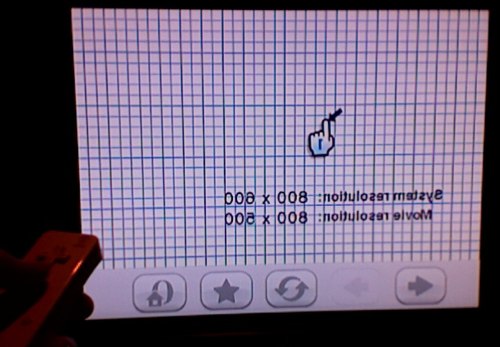
System.capabilities tells me that the system resolution on the Wii -- at least what is reported to Flash -- is 800 x 600. On a test SWF, set to 100% width and height, you get Stage dimensions of 784 x 484 with the default Macromedia HTML and 800 x 500 by hitting the SWF directly. Setting all of the margins to zero on the HTML page removes the 16x16 border and gives you the same 800 x 500 resolution.
I start to wonder whether the supported resolution is affected by the display settings in the Wii Options and decide to test it out.
Initially, I test with the TV Type set to 60Hz (480i) and the widescreen settings set to Standard (4:3). This results in the browser's controls appearing slightly cut off on my screen (46" Sony Bravia W series/1080p). Next, I try it at 50Hz (576i), again with Standard (4:3), and that gives me the same results.
Next, I change the widescreen settings to Widescreen and hit the same test page. This time, the system resolution is again reported at 800x600 but the Stage width and height defaults to 1024 x 500 (100% width, 100% height, stage set to noScale and align TL). The grid I'm drawing, however, looks all wrong. The aspect ratio is way off and there's definite antialiasing.
Update: I just tested with pixel values (the movie set to 800px by 500px) and I can confirm that this is the largest movie size that the browser will display without showing the scroll arrows. I also included a mock Wii safety image from IconFactory.com in the test file that is 800 x 500 px.
I'd love to hear what results you get with your TV set. If you have a Wii and the browser, hit the Flash resolution test file for the Nintendo Wii (http://aralbalkan.com/wiipii/arrow_wii.html) and report your results in the comments.
When leaving a comment, it would help greatly if you can mention the following information:
- TV Brand
- Standard or Hi-def
- Max res. (eg. 720p, 1080i, 1080p, etc.)
- Wii settings (4:3 or 16:9 and whether you're running at 576i, 480i or 480p)
So, does anyone else have information they'd like to share on developing for the Wii?
Comments
by Flo on 2006-12-26 23:42:03
by aral on 2006-12-27 00:41:33
by Satori Canton on 2006-12-27 06:15:19
by Mike Downey on 2006-12-27 06:17:32
by Satori Canton on 2006-12-27 06:22:54
by Kenny Bunch on 2006-12-27 14:07:22
by aral on 2006-12-27 14:41:54
by Philippe on 2006-12-27 15:48:05
by Mario Klingemann on 2006-12-27 17:28:35
by aral on 2006-12-27 20:39:33
by Flash performance on the Wii at Aral Balkan on 2006-12-27 21:04:33
by Mickey on 2006-12-28 22:29:52
by aral on 2006-12-28 22:40:01
by Mickey on 2006-12-29 00:08:54
by Monopolio Podcast .... el podcast más demandado on 2006-12-31 20:22:33
by friz on 2007-01-02 19:44:47
by friz on 2007-01-02 19:55:48
by Don on 2007-01-21 01:40:22
by dispatchEvent » Blog Archive » 2007 Tech Preview on 2007-01-07 01:59:24
by aral on 2007-01-21 12:50:46
by Rusty Mitchell on 2007-02-21 04:05:55
by Dhaval on 2007-03-17 01:26:32
by aral on 2007-03-17 08:18:45
by Wii FanGirl on 2008-08-04 04:30:06
by Nintento Wii & Flash | celar.nl on 2008-03-21 16:11:49
by free wii on 2008-10-17 14:55:04
by Sam Frank on 2009-03-17 23:01:45
by Wii Flash Development Resources Collection | diamondTearz on 2009-01-02 13:17:13
by habibie on 2008-11-29 04:43:31
by mikedowney|blog » Nintendo Wii supports Flash Player 7 on 2009-03-27 01:40:59
by Marcel on 2009-07-07 18:23:05
by stephanie on 2009-12-08 18:22:53
by Shane Gamble on 2012-01-25 13:20:56