
Best practices for client-side validation in Flex 2
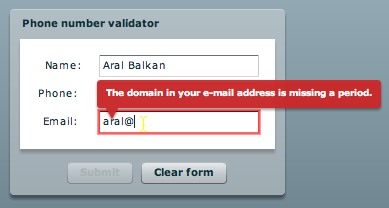
When it comes to designing user interface behavior, there is definitely more than one way to skin a cat.

While writing the Validating Data Quick Start for Flex 2, I wanted to provide more than just the basics of using Validators in Flex 2. Although the default behavior of validators in Flex 2 works, simply binding a couple of validators to your form controls will not provide the most usable experience for your users. I won't go into detail on the reasons for this (see the Quick Start for that) but there are a number of design considerations that must be met to create usable validation.

The best practices for client-side validation section in the Validating Data Quick Start contains a Flex 2 example that follows the User Interface Design Principles for Web Applications that I published earlier. You can easily use the code in the example to help you create best-practices client-side validation for your own applications.

And before anyone asks, no, this doesn't in any way remove the need for you to do user testing! :)

10 Responses to “Best practices for client-side validation in Flex 2”


  1. 1 Gilles

    ALl these are great as usual Aral.

    Where do you get the time you are amazing see you soon

    gilles

  2. 2 sascha/hdrs

    I like it how the deep red contrasts with the pale blue-gray of the theme!

  3. 3 Douglas Knudsen

    I’d really like to see how you approach this topic when all sorts of bindings are invovled. For example, you have a textinput whose value is bound to a model variable and the model variable is bound to the textinput, AKA double binding. Where to put validators in this mix? Further, where to put formatters, eh?

    DK

  4. 4 aral

    Hi Douglas, I didn’t separate out the model in this example since I didn’t want to complicate it further. I did create a version that had this, however, and I might publish that later myself because it’s a very valid question. It’s not that much more complicated however.

    Personally, I don’t like the way formatters are implemented in Flex 2. I don’t find them very flexible. Would have preferred if they used a more event-driven process. Regardless, however, you have flexibility in assigning them in the controller part of your application.

    Take a look at the Data Binding section for the MVC approach to binding. I would then add validators and formatters in the same manner.

  5. 5 Matt Brailsford

    Hi Aral,

    I have a question about this approach.

    This works great for empty forms thats require input, but how would you work with edit forms? ie forms that are populated with existing data that requires editing.

    Under this senario, the submit button would be disabled initialy even if the form is technicaly valid.

    Matt

  6. 6 vaibhav
  7. 7 Mike

    I’m new with Flex development and I stumbled upon your quick start on Validators. After implementing the quick start solution I felt that although it was nice, I’ve abandoned any color blind folks that might use my form. There needs to be visual indicators in addition to turning a border red. Also given that I’ve never seen an application on the web that disables the submit button by default, I’m wondering if that would just cause more confusion for the users (not to mention those pesky color blind folks, can they even see the difference between an enabled and disabled button).

    I would love to have some ability to display the error tip in addition to turning the border red and have the error tip show up on every field that has an issue when the user tries to click the submit button. I think expecting the user to roll the mouse over the error field to see what is the problem is not user friendly.

    At this point I’m about to abandon the Validators and just go back to displaying errors in red at the top of the form.

    Have you had any additional thoughts on the validation topic?

    Thanks in advance

    Michael

  8. 8 Colin

    Aral, this was very helpful. Being very new to Flex, I wonder how this could be adapted to still disable the button when one of the fields is required and the user doesn’t type anything in it. Because the TextInput only seems to have methods based on user input, the button is still lit.
    Thanks,
    Colin

  9. 9 Geoff

    I like your best practice principles for validation, but I think there’s another that could be added, which is “When Possible, Don’t Permit the User to Make Mistakes in the First Place”. You can do a Change event check to boot out any non-valid characters before they even show up in the Input. For instance, I don’t think most people deliberately insert a letter into a telephone number, so most likely the letter is an accidental keystroke.

    It’s not always appropriate, but passive rejection of invalid characters is the ultimate way to keep the user flow as seamless as possible.

    Late post, I know, but any thoughts?

  1. 1 Plaigarizing blog posts is stupid at Aral Balkan

Leave a Reply


Bad Behavior has blocked 0 access attempts in the last 7 days.