“Forgot password” UI Pattern
An illustration that even a simple forgotten password form can harbor refinements that improve the user experience.
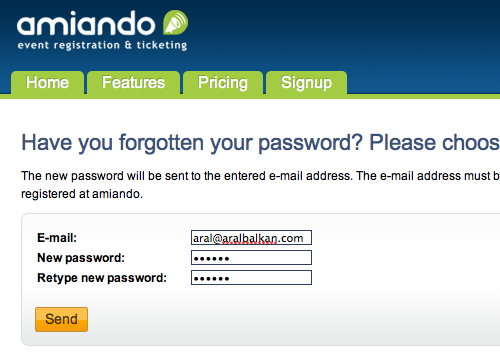
I just stumbled on the best "forgot password" implementation I've seen on event registration site Amiando.
You've no doubt seen various implementations of this UI pattern: all of these rely on using your email address to verify that you are indeed the user requesting the password reminder (or reset). But – as with everything else in UX – the devil's in the details (it's about The Little Things), as they say.
I keep coming up against two implementations that seem to have become de-facto standards:
Amiando's form, however, implements a subtle evolution on the second method that makes the process even easier: on the initial form, they ask you for the new password. It's a simple little thing but it does mean that they've grouped the bit that requires cognitive load in one place. Now, all I have to do is click the link in the email to confirm my request and I'm up and running with my new password. It also means that the confirmation link has a single function and that its meaning is not overloaded to mean "confirm this request and then go on the site to pick a new password".
The Amiando implementation does fall flat on two important details however:
Firstly, it doesn't remember your email address. Since you've already entered your email address while trying to sign in, the forgotten password form should remember that email address to save you effort. I've seen this error made by nearly every forgotten password form I've encountered, so other developers should take note. It's not a difficult refinement to implement and it will result in an instant usability boost for your app (especially at a time when the user, not being able to sign in, is already frustrated).
Secondly, when you click on the link to confirm your new username and password, the site doesn't sign in you in automatically. Since it has confirmed your identity at this point and knows that you were trying to sign in, it should take the initiative and save you some effort.
(One of the worst implementations of this pattern that I saw actually changed your password without confirmation and then sent you an email with the new password. What a nightmare! Using that system, anyone could force a password change on your account on a daily basis, thereby forcing you to sign in and change your password back and probably driving you insane in the process.)
Check out the Amiando forgotten password form.
The “Forgot password” UI Pattern article by Aral Balkan, unless otherwise expressly stated, is licensed under a Creative Commons Attribution-Noncommercial 2.0 UK: England License.An illustration that even a simple forgotten password form can harbor refinements that improve the user experience.
Thank you for the article and the kudos :)
I also did not like most implementations of the forgotten password feature, thats why we tried to improve it.
About the caveats:
You are absolutely right, it should remember the email of course and it is also implemented to behave this way. I will take a look why it doesnt work as intended currently and fix it.
And you are also right about the auto login: If someone gets access to the email account he could change the password of the account anyways, so asking for the password again offers no additional protection.
Thanks for the hints :)
Armin
You’re welcome, Armin – glad I could be of help & looking forward to your updates :)
This is a much better step than getting to have the password reset, luckily, I was about to implement it and came across this make my life more easier!
Isn’t security an issue here, especially if it automatically logged me in? For example, if I know your email address and know you’re a member of the site, all I have to do is visit the forgot password page and I’m in.
Whoops, I see now you said it should log you in AFTER you click the link. So really the only problem here is that you could get a lot of emails caused by someone trying to change your password, but the same is true in the other implementations as well.
This approach does have one potential problem: if the owner of the password is not paying proper attention and clicks on a confirmation link they did not request, the attacker immediately has their password. The text of the email would have to be dramatic enough to warn of this. However, anyone who clicks idly in emails these days probably won’t have their password for long anyway :)
your suggestion has a security problem, if I write a script that automatically fills out the form with “guessed” email adresses (generated from adress lists etc.) and a my password, I’m sure there will be a small percentage of email recipients confirming the link not knowing what exactly they are going to do there. after a couple of hours my script could easily break those confirmed accounts using my password…
I’m all for innovative ideas. They keep us from getting into a stale groove. However, unless you have left out a step, I think this idea needs a serious revisit for the obvious security issue.
Scenario: If I know your email address and initiate the password reset with a password of my choosing, all I need you to do is click a link. If I login and change your email address before you realize what happened and change the password again, I would own your account.
You can see my latest implementation of a password reset feature here: http://acoderslife.com/index.cfm/blog/Careful-not-to-innovate-yourself-a-new-security-hole
Basically, it just sends you a link that logs you in. From there, you can just update your profile with a new password.
Of course, I am on the inside looking out on this one so feel free to scrutinize :-)
What happens when someone get a hold of an email that isn’t theirs, resets the password, logs in becuase they now know the username and password and then change the email associated with the account and the password. The original owner if completely locked out.
Ohhh! i didn’t read the verification part. That’s actually really sweet!
Smart & simple.
Made my day! :-)
The form says my password will be emailed to me. If this is true, it is worth noting. Having a fresh password emailed in plain text should certainly qualify as one more caveat.
Getting the user to re-enter the password after they click on the confirmation link before the new password is made official seems to be a way to add one more level of security to this pattern by proving you know the new password. It would deal with the issue of someone blindly clicking a link from the new source.
Aral, we’ve been using the same password-reset pattern as Amiando for some time, and we’ve found it works well. We use a similar pattern for new account sign up on Hashwork. Sign up form is right on home page, you enter your email and pick a password, then you get a link which verifies, and signs you in.
I have a document that I downloaded in 2008 I don’t remember ever using a password on the free reader program. When I try to open the 3 year old document a password is called for. What can I do?
Hamish – I was thinking this exact same thing – the password must not be changed immediately on a single click from the email, because it is all too easy for it to be clicked without thinking.
If the email link instead takes the user to a page where they need to re-enter the password they have chosen, just once, then that will prevent any accidental changing of their password.
It also means the password entered in the very first form does not need to be stored in any retrievable form – it can be [one-way] hashed and compared against the “confirmation page” password that is entered. It is that final password entered by the user that is sent for storage.
In my particular application, the passwords are stored in an offline CRM. The website sends the plain text passwords to the CRM (over an encrypted connection) and the website has no involvement in the way that password is hashed within the CRM. This means I can’t hash the password into its final form when the user first requests a password change.
I like this approach.
– Jason