
28 Aug 2009

Snow Leopard WiFi Connection error

I just upgraded to Snow Leopard and immediately found myself severed from the Internet: I couldn't connect to the BTOpenZone WiFi network (or see any other networks) and neither could I connect with my T-Mobile USB stick.

Removing the Automatic location in System Preferences → Network → fixed the T-Mobile USB stick issue (you have to add a DIAG connection and set the telephone number to *99# since the web 'n' walk app that comes on the USB stick – which I wasn't using anyway – crashes under Snow Leopard).

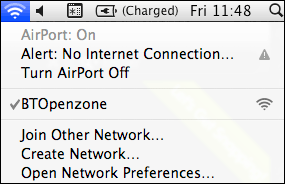
After making this change and turning Airport off and on again, I was able to connect to the BTOpenZone network but the connection dropped out after a while and it returned to not being able to see the network. I restarted Airport again and initially it gave me the new Alert: No Internet Connection message (see screenshot) and then finally connected. Fingers crossed, it seems to be staying up this time. Although the BTOpenZone networks at Starbucks appear to be entirely unreliable themselves (frequently crashing and having to be restarted those times when the actual Internet connection itself isn't a roller coaster ride of dropouts and slowdowns), my iPhone had no trouble whatsoever seeing or connecting to the same network.

So, although the new usability enhancements in the Airport UI look good (e.g., telling you when you're connected to a network but don't have an Internet connection), it does appear that the actual connectivity is much less stable. Ah, as I was writing that it lost the WiFi connection again.

My T-Mobile USB stick connection, on the other hand, appears to be solid (and the dial up process is faster now) since I trashed the Automatic location.

I'm assuming I won't be the only one encountering WiFi issues with Snow Leopard so here's hoping there will be more workarounds and quite possibly a patch posted soon.

I would have loved my first post on Snow Leopard to have been on the user experience improvements, etc., but those don't really matter when the most fundamental feature (the Internet connectivity) takes a step back in terms of stability.

Add Your Comment

Spam Protection by WP-SpamFree

Snow Leopard threw me off the web: WiFi and T-Mobile 3G USB Stick connectivity woes
  1. Why is it that OS X has so many WiFi problems. I’ve had such poor WiFi signal on my MacBook Pros that I’ve tried *everything*, this is largely due to the metal case I have been told.

    Anyway, I’m going to get Snow Leopard tomorrow, but there’s a couple of things you might try… the drivers and settings panel for the Airport card can be found in /System/Library/Extensions, the files are AppleAirPort.kext and IO80211Family.kext.

    These have been updated recently for the late 2008 MBPs (not the new new ones), I think the update was included in 10.5.7 combo. On my last machine I had success using an older driver after an update totally broke it. So yeah if you’d like to try my versions of these (pre-SL), let me know I’ll get them to you.

    Some more info on replacing these: http://selfsolved.com/problems/macbook-pro-network-access-slow/s/42

    Richard Leggett
  2. I should have added, the symptoms you describe. Dropouts followed by not seeing the network, are exactly indicative of this, and well documented online (with various non-solutions).

    Funnily enough one that tends to work is plugging in to an ethernet connection and taking that back out. It clears something.

    Richard Leggett
  3. Thanks, Richard. Believe it or not, I think time may have cured it :) Maybe it was a cache-related issue or something. Fingers crossed, the WiFi appears to be back to normal :)

    Aral
  4. Me too having massive WiFi problems with SL!!! Glad I’m not alone. Running 15 inch MacBook Pro with AirPort Utility 5.4.2. Me in Twitter on /madinagoodway, could you please let me know if you discover a remedy? Thanks :-)

    Mari
  5. My Wifi was seeing the network but not connecting to the internet with SL. Following your suggestion to delete the Automatic location and rename the location group Untitled worked for me. No idea why this worked because the same locations were listed under Automatic as they are in Untitled. It will be interesting to see what happens at work tomorrow, when I try to hook up to the office network. Thanks for posting this problem so timely.

    BrentMack
  6. Hi, thanks for this informative post. I’m using a t-mobile USB Stick 530 in the UK and Snow Leopard crashed (grey screen, followed by message to reboot) as soon as I insert the stick. I did upgrade from Leopard and didn’t bother with a clean install. Did you face a similar problem? Thanks

    DB
  7. Hi! I have the smae problem as DB. I have a t-mobile web’n’ walk usb stick and when i try to using, as I insert it, a messig will pop up, and said in 5-6 languages to reboot my macbook. I tried everything, I deleted the t-mobile driver, the problem hasnt gone. But I gave the stick to one of my girlfriends and in her macbook it worked with SL. So Serriously what the hell going on? PLease help me

    Gigi
  8. I tried getting my mum’s to work, unfortunately t-mobile phased out the compatible Huawei devices, in the UK and introduced these God-awful Qualcomm devices, which cause Snow Leopard on my Macbook to Kernal Panic upon entering my USB ports. Le sigh…

    Sam Taylor
  9. I was in the Indianapolis airport and having the exact same issue as you guys with SL seeing the network but not connecting. I tried the method of removing the Automatic location and using Untitled and it immediately connected. Wonder what the glitch is, and hoping it is resolved soon.

    BennettS
  10. Although, it appears that the network pane in system preferences reports that I don’t have an IP address and that Airport cannot gain one…however my connection is working perfectly, as I am posting this. Very odd.

    BennettS
  11. quick question Gigi – did you do an upgrade install and did your girlfriend do a clean install? I did an upgrade, so maybe that’s the reason for the problem?

    DB
  12. No problems with WiFi after the SL upgrade, but installing the T-Mobile Internet Manager and connecting the web’n'walk stick fusion (black) resulted in a complete and unresolvable OSX freeze upon restarting, forcing me to re-install Snow Leopard.

    It now appears to run OK even with the TMIM installed, though I do use the settings in the Network pref pane to connect manually (account: t-mobile, pw: tm, APN: internet.t-mobile.de).

    Need to disable SIM-card PIN in the TMIM first for the manual connect to work (Settings tab, remove checkmark on top left).

    Felix
  13. Solution

    right click on the web’n'walk package, select show package content
    then run MobilePartner.mpkg… this will create the 2 devices in the network interfaces…
    reboot, then insert manually the configuration as described in the posts above…
    in the network preference for the new device, just put this as phone number (UK version)

    *99#

    then click apply then connect… and it works…
    I hope this helps

    alex p
  14. Tried a Snow Leopard upgrade and had either incredibly slow network speeds via WiFi, or no connection/intermittent connection problems. Tried every “solution” out there and nothing solved the problem permanently.

    I finally gave up and restored my Time Machine backup of Leopard.

    Are the execs at M$ running Apple now? This problem was apparently evident in early beta versions of SL, and obviously, nothing was done to remedy the problem.

    Snowdog99
  15. Alex, I don’t see the Mobile Partner mpkg file when I do a show package contents on the installer package for Web N Walk. I’m guessing we have two different versions of the usb Modem – mine is the USB Stick 530.

    DB
  16. Two installs of SL and two different sets of problems with it “forgetting” user configuration settings. On one machine it lost all the network settings and somehow forgot where some of the applications on the menu bar lived. On second machine it lost all my printers. Not what I was expecting.

    Will
  17. I too am currently having this problem after a clean install of Snow Leopard. I really wanted to like this upgrade but it’s brought about the most problems since I started using Macs =/. I hope either a solution is found or better yet Apple updates soon, I hear 10.6.1 is in the works but doesn’t have a large bug fix yet.

    Fetimo
  18. Hello there.

    I have no problems at all using BT Openzone and Fon connection, either before install SL or after. But the web ‘n’ walk manager crashes as you guys. Over.

    DHL
  19. OK, I’m not very computer savvy but have spent all day trying to to get internet up on imac and macbook after upgrading to Snow Leopard. Reminds me of fruitless hours trying to solve windows problems. Ironically I’m on this website thanks to my old thinkpad – router is clearly, OK it’s the connection to the macs that has me foxed.

    Any advice extremely gratefully received

    BJ

    BJ
  20. Thanks, it is validating to realise I am not the only one and thanks again for pointing the way to the solution. This is why I run PC and Mac side by side it is terribly wasteful and if a communist state had designed this it would be condemned but ho hum at least there are guys like you blazing the trail!

    Simon Halstead
  21. After installing Snow Leopard my internet connection slowed down to a crawl. After spending far too much time trying to fix it I took out the hard disk with SL and put Leopard the original Leopard disk back in my MacBook Pro aluminum – all is fine again. What a disappointment – I feel like Aplle has pulled a microsoft on me and that $29 upgrade was money throwen away.

    I always have a backup hard disk of any major upgrade.

    Mordichka
  22. This is for all the t-mobile UK folks that have an Option / Qualcomm USB Mobile Broadband device (you can find this out by reading the underside of the device)

    This one threw me for a while.

    Remove the Stick – otherwise you’ll get a Kernel Panic…

    Uninstall the web’n'walk software.

    Go to the option site > Support > Software Download > USB Modems > iCON 431 > MAC Driver 3.26.0. They use a .NET postback, so I cannot give a download link here. Link to the page is http://www.option.com/en/support/software-download/usb-modems/icon431/

    Now install the drivers, and then go to System Preferences > GI41x Modem.

    Stick your modem in.

    Now use the *99# trick to the telephone number box.

    It should connect, no probs

    Ben Hoskins
  23. Just adding my name to the list of people who have had internet connection issues since upgrading to 10.6. The only difference about my story is that my problem isn’t intermittent — I cannot ever load any web pages despite a full connection to wireless routers.

    Sam
  24. Just tried Ben Hoskins suggestion (22), but instead of using the modem preferences I re-installed the web’n'walk software and everything is back to normal.

    Danny Turner
  25. I just got my problem (post #23) fixed after a surprisingly brief call to Apple tech support. here’s what I had to do:

    1.) Open the Network preference pane in System Preferences.

    2.) Select the “Airport” service. Delete it by pressing the minus sign at the bottom of the window.

    3.) Click the plus sign to add a new service. For the Interface, select “Airport.” Press “Create.”

    4.) Press “Apply.”

    5.) Select the new service (it will probably be called “Airport 2″) and make sure Airport is turned on.

    That’s all I had to do! The support tech did mention that I might have to do this again for when I plug in to an Ethernet connection, but that’s no big deal.

    I do want to mention that I never had the intermittency issues mentioned by many here and elsewhere. I simply could not ever access the internet, despite full wireless connection or Ethernet connection.

    Best of luck to you all.

    Sam
  26. Same with the older HUWAEI 3G sticks.

    While these are 3rd party devices, t-mobile have some responsibility here – I’m fed up with vendors acting like OS updates – whether Snow Leopard or Vista – are some huge surprise that’s caught them unaware (ditto, for instance, Adobe announcing their stance of SL a week before release – they could have given CS3 customers a good 12-18 months notice, which may have encouraged some upgrades).

    Having spoken to t-mobile, of course ‘their are problems with Macs’ – an interesting way of expressing it, seeing as it looks from my point of view like the problem is 100% with the driver software they supply. And another reason why I dislike anything that requires 3rd party drivers / kernel extensions.

    JulesLt
  27. I had the same problem. After upgrading to SL this internet slowed to the dial-up days. Although I was able to join my home wireless network (dropping connection occasionally) I was not able to join other WiFi networks, I could see them and the signal looked strong, but I could not get any internet connection. I just tried the post 25 and my internet is as fast or faster than ever. Thanks. And I seem to be able to join other networks with no problem.

    Lisa
  28. Solution at post 25 works for me. Sam – thanks very much! I’ve been trying to fix this for a while now. Your simple solution works well, and is easy enough for non computer-savvy people to follow. Never mind finding files, cutting, replacing and extracting solutions I have seen elsewhere – this is the one to try first. I hope the thousands of people in my situation manage to find it.

    Masoon
  29. Wow! Thanks guys for all your help. I spent a whole day trying to figure out what was going on with my USB stick 530 having upgraded to SnowL and going round in circles on the t-mobile support pages. They were totally useless. Again this proves the power of the internet. Seriously, i wouldn’t have got this to work again had it not been for these really useful posts. David

    David Wakefield
  30. i had the same problem – really erratic internet connectiviy. i think i worked out the solution – enable the firewall. once i did this, my snow leopard system suddenly worked flawlessly…

    …well, at least on firefox. safari’s a different story :)

    jph
  31. Me too. Just bought a new Macbook Pro w/Snow Leopard and updated to 10.6.2. The wifi is very sketchy – it keeps dropping the connection. My old Leopard (10.5) Macbook has no issues on the same wireless network. Grrr!

    Metoo
  32. Downloading the latest driver here:
    http://www.option.com/en/support/software-download/usb-modems/icon431/

    Then installing the web’n'walk software seems to have done the trick for me, before I was getting a grey screen of death whenever I inserted the USB Stick 530.

    tipsforattractingwomen
  33. Hello,

    our 3G-connection manager launch2net for Mac OS X now supports the T-Mobile FUSION stick for 10.6.

    http://www.novamedia.de/en/mac-launch2net.html

    Kind regards,

    Jan Fuellemann (nova media)

    Jan Fuellemann
  34. Suffering exactly the same issue on BTOpenZone and BT FON. BT said they had a lot of users suffer this when SL was first launched but apparently recent Apple update fixed this….but I’m on 10.6.6 and still suffering … any update your end would be much appreciated!

    Amer Khan