
What is SWX, how does it work, and where is it going?
I do some of my best thinking (and singing) in the shower. So it's no surprise that this morning, while in the shower, I decided to review my plans and roadmap for SWX. Here's a direct-from-the-shower look at what SWX is, how it works (with a few examples to get you up and running), and roadmap of where SWX is heading.
Some of the contents of this post will be familiar to my friends at Yahoo! UK, where I presented SWX earlier this month. (Thank you guys for your amazing support, it means a lot!)
Definitions
Let's start at the beginning with some definitions. When I first embarked on SWX, the technology and implementation were one and the same. Several months on, SWX has matured and simply bundling everything in the SWX ecosystem as "SWX" is not sufficient. To that end, here are some definitions of SWX-related concepts to start us off with a common vocabulary for talking about SWX.
- SWX: Native data format for Flash. It is a subset of the SWF format. SWX SWFs are regular SWF files that are used to store just data.
- SWX RPC: RPC protocol encoded in SWX. Allows you to call methods on server-side classes and get the results in SWX format.
- SWX PHP: SWX RPC implementation in PHP. SWX PHP is currently the only implementation of SWX RPC but there will be Python, Ruby, J2EE, .Net, etc. implementations in the future.
- SWX Tools: The SWX Service Explorer & SWX Data Analyzer. These tools come bundled with SWX PHP and will work with any future implementations of SWX RPC.
- SWX AS: A high-level ActionScript library that handles the client-side queuing and execution of SWX RPC calls. You don't have to use the ActionScript library to work with SWX RPC as SWX is native to Flash but the library does provide you with useful functionality such as cross-domain access, queueing of data calls, etc.
- SWX APIs: APIs for Flickr, Twitter, etc. I am as excited about the SWX APIs as I am about the SWX data format and SWX RPC as they provide Flash developers with a very easy way to create mashups. In fact, if you hit the Public SWX RPC gateway (see below) at swxformat.org, you can use these APIs with ActionScript alone (no server-side programming is necessary.)
- Public SWX RPC gateway: Open SWX RPC endpoint. The Public SWX RPC Gateway is at http://swxformat.org/php/swx.php. You can use the public SWX APIs from this gateway in your own applications without having to write any server-side code whatsoever.
Supported platforms and technologies

You can create and load SWX SWF files with any version of Flash (5+) as they are simply SWF files. As far as manually creating SWX files go, SWX is supported on Flash 5+.
SWX PHP, the current SWX RPC implementation that I'm working on, creates SWX files that are compatible with Flash 7+ Flash 6+, Flash Lite 2.0 and Flash Lite 2.1. Currently, SWX PHP does not support Flash 9/AVM2 but it will eventually do so.
SWX AS, the SWX ActionScript library, compiles on Flash 7+ Flash 6+ and MTASC.
You can use SWX PHP currently to create applications that run on mobile phones (Flash Lite 2.0/2.1), the Nintenso Wii, Sony PS3, and devices like the Nokia N800 internet tablet and the Chumby.
You can also wrap SWX-based applications to create desktop versions using Adobe Air.
SWX (SWF Data Format)
SWX is the native data format for Flash. Data is stored as SWF bytecode (you can't get more native than that on the Flash Platform) that is interpreted by the Flash Player. The SWX format is a subset of the SWF format (just like JSON is a subset of JavaScript).
SWX is open. I am in the process of writing an Internet Draft (I-D) for SWX which I hope will become an informational RFC.
You loadMovie() SWX data files and they are ready to use the moment they are loaded. You don't need to deserialize or massage the data in any way before using it as it is stored in native Flash objects.
Why do we need a new data format?
When I first announced SWX, Patrick Mineault questioned whether SWX was reinventing the wheel. Why, he asked, do we need SWX when there is AMFPHP? (AMFPHP is a PHP implementation of a Flash Remoting gateway).
To start with, comparing SWX and AMFPHP is like comparing apples and oranges. As I stated earlier, SWX is a new data format for Flash and SWX RPC is a remote procedure call protocol encoded in SWX. As such, we can compare SWX to AMF (the data format) and SWX RCP to Flash Remoting (the RPC protocol) and SWX PHP (my PHP implementation of SWX RPC) to AMF PHP.
So the real question becomes, does the Flash Platform need a new data format and a new RPC protocol? I believe it does and here are some reasons why:
- Existing formats are non-native, complicated, require parsing and/or writing plumbing code e.g., XML, variable-encoded strings (LoadVars, loadVariables), Flash Remoting, etc.
- SWX files have low processor overhead when parsed by the Flash Player as they are native (SWF bytecode)
- SWX RPC is the only RPC solution for Flash Lite 2.0 and 2.1 (and thus for mobile Flash applications). Flash Remoting does not work with Flash Lite.
- Most important: SWX, being native, has inherent advantages such as cross-platform data exchange (via allowDomain support for SWF files), simplicity (no ActionScript library is necessary to use it), etc.
It's my first belief that every platform can benefit from a native data format that does not require parsing. The main advantage of SWX over other data formats and of SWX RPC over other RPC solutions is ease of use. I hope that this ease of use will spur a wealth of development of data-driven applications and mashups on the Flash Platform by developers who may traditionally have shied away from creating such applications because it was just too darn hard to do so.
SWX RPC
SWX RPC is a remote procedure call protocol encoded in SWX format. You use it to call methods on server-side classes (called services in SWX RPC) and get the results returned to you in SWX format.
SWX RPC is open. I am in the process of writing an Internet Draft (I-D) for SWX RPC which I hope will become an informational RFC.
SWX RCP is stateless, lightweight, and uses HTTP as the transfer protocol.
A typical SWX RPC call involves parameters sent from Flash to the SWX RPC endpoint (gateway) in JSON format. These consist of serviceClass, method, and args parameters that define the method on the service class that you want to call on the back-end and the arguments that you want to send to that method. The resulting data is returned to Flash in the result property.
SWX PHP
SWX PHP is a SWX RPC implementation in PHP. It is open source.
SWX PHP is written in pure PHP. It doesn't require any extensions and runs under both PHP 4 and 5. (As such, it runs without problems even on shared hosting accounts.)
SWX PHP has a SWX RPC endpoint (gateway) and an assembler that creates and returns SWX files. Your service classes contain business logic only.
SWX PHP comes with service classes (APIs) for Flickr, Twitter, Ten Word Review, Nabaztag, etc. There is a publicly accessible instance of SWX PHP running on swxformat.org at http://swxformat.org/php/swx.php. You can access these APIs from this public gateway without hosting your own instance of SWX PHP if you want to build mashups using just these APIs.
SWX PHP uses Amfphp as a library and this means that you can also hit SWX PHP services via Flash Remoting, JSON and XML-RPC. (In other words, you're not locked into using SWX RPC and you can switch easily between these various technologies if you want to.)
SWX PHP comes with a plain vanilla installer (unzip it into your web folder on the server and go) and as a MAMP Bundle (everything you need to get up and running with SWX PHP on OS X). I am planning on creating Windows and Linux bundles as well in the future. In the meanwhile, I recommend using WAMP on Windows and XAMMP on Linux is you want to quickly get up and running with a server (Apache + PHP, etc.) on your development machine.
SWX PHP adheres to SWX’s core philosophy of Systemwide Simplicity.
Systemwide simplicity
A system is only as simple as its most complicated part. It's not enough to just simplify individual components and processes, you must also simplify the relationships and interactions between components and sub-processes. Systemwide Simplicity takes a wider approach to simplicity that involves understanding and supporting the entire user experience.
It is thus my aim to make it as easy as humanly possible for Flash developers to start creating data-driven Flash applications from the moment they arrive on the SWX homepage to the moment they first get data into Flash using SWX RPC.
How simple is SWX? Moo card example
SWX is so simple that instructions for getting data into Flash using it easily fit on to a Moo card. (In fact, I've just ordered two sets of Moo cards with just this example on them -- ask me for one if you see me around!)
To get a list of the most recent 100 photos from Flickr into Flash, do the following:
- Open up the SWX Data Analyzer
- In Flash, create a new FLA and create a movie clip on the Stage. Give it the instance name
loader. - Write the following code on to the frame that the
loadermovie clip is on:
loader.serviceClass = "Flickr";
loader.method = "swxPhotosGetRecent";
loader.debug = true;

loader.loadMovie("http://swxformat.org/php/swx.php", "GET");
That’s it! Test your movie and look in the SWX Data Analyzer to see the results being loaded in to Flash from Flickr. That’s how simple SWX is.
If you want to display the results from within Flash, create a long, single-line dynamic text field on stage and give it the instance name status. Add the following code to the timeline:
function onEnterFrame()
{
    status.text = loader.result.photo[0].src;
}
Initially, the status text field will display undefined until the data is loaded and then it will display the URL of the first photo from the list of recent photos that is loaded from Flickr. Notice how you can access the results as native Flash objects the moment they’re loaded. No deserialization or massaging of the data is necessary!
Read the next section to see a better way of handing results using SWX AS and the SWX Class in ActionScript.
Building a complete web application (back-end and front-end) with SWX PHP
In the next ten minutes you are going to learn everything there is to know about exactly how SWX PHP works by building a very simple, but complete, data-driven Flash application. You will be using Flash to create the client and PHP (with SWX) for the server.
Installing SWX PHP
If you haven’t done so already, download and install SWX PHP on to your computer. Before installing SWX PHP, you will need to have a web server running PHP on the machine you’re installing it on.
If you’re on a Mac, running OS X, download and install the SWX PHP MAMP Bundle. This will have you up and running with everything you need using a simple installer.
If you’re on Windows, I suggest installing WAMP and, on Linux, XAMMP. Both of these are single-click installers that provide you with a turnkey development environment with a web server (Apache) and PHP.
Once you’ve installed a web server and PHP, just download SWX PHP and unzip it into your web root. Start your web server and hit the web root in your browser to access the SWX PHP Start Page.
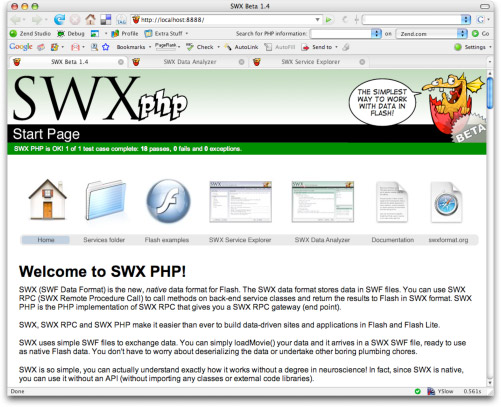
The application you’re going to build is a simple calculator that uses a server-side method to add two numbers together.
To start, you're going to create a PHP service class. In SWX you place service classes under the php/services folder.
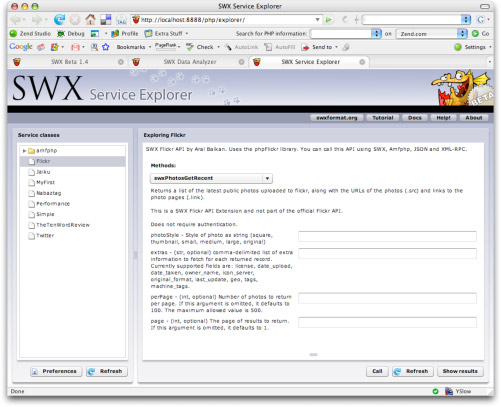
SWX Service Explorer
To see what services are already in the services folder, you can use the SWX Service Explorer that comes with SWX PHP. Open that now and you will see that there are several services there already.
Creating the Calculator service class in PHP
Create a new file using your text editor of choice under php/services/ and call it Calculator.php.
Add the following code to Calculator.php and save the file:
<?php
    class Calculator
    {
        function addNumbers($n1, $n2)
        {
            return $n1 + $n2;
        }
    }
?>
This is a very simple server-side service class that has a single method called addNumbers(). This method takes two numbers as arguments and returns their sum.
At this point, it would be nice if you could test the server-side method you just created without having to create a Flash client. SWX Service Explorer lets you do just that. Testing server-side methods with the SWX Service Explorer
Return to the SWX Service Explorer (or open it if you didn't earlier) and you will see the Calculator class you just created. Click on it and you will see the addNumbers() method that you just created. Enter two numbers in the $n1 and $n2 fields and press the call button to test out the method. You should see the sum returned in the results area.
Your server-side service method is working correctly. Now let’s call it from Flash.
- Open up Flash and create a new FLA (ActionScript 2). You can set the publish setting to Flash 7 or 8.
- On Frame 1 of the new FLA, create a movie clip instance and give it the instance name dataHolder.
- Create a new layer and call it Actions. On the Actions layer, add the following code:
dataHolder.serviceClass = "Calculator";
dataHolder.method = "addNumbers";
dataHolder.args = "[35, 7]";
dataHolder.debug = true;

dataHolder.loadMovie("http://localhost:8888/php/swx.php", "GET");
That's it! That's all the code you need to call the addNumbers method on the Calculator service class in PHP and pass it the numbers 35 and 7 as arguments. The loadMovie calls the SWX gateway and passes to it any of the properties you set on your movie clip. In this case, since we are sending a small number of arguments, we use the GET HTTP encoding method. We could just as easily have used POST.
SWX Data Analyzer
Before testing the movie, open the SWX Data Analyzer in a separate browser window.
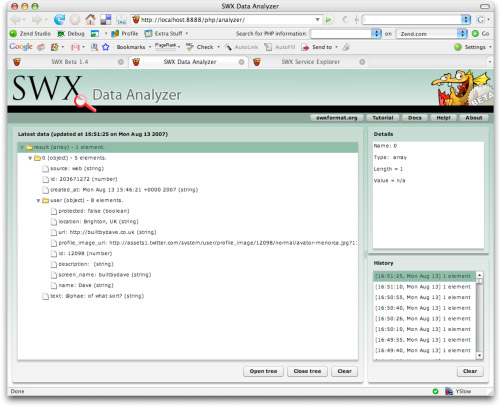
SWX Data Analyzer is a debugging tool that shows you the SWX data that arrives inside your Flash movie.
To make SWX data that loads into the Flash player appear in Analyzer, you turn debug mode on. That's what the line dataHolder.debug = true does.
Now, test your movie and then look in the Analyzer. If all went well, you should see the number 42.
Accessing the result property
That's great, but now let's display that result in Flash. You're going to implement a quick hack to get it working and we can evolve the application later to improve it.
Add a TextField instance to the Stage and give it the instance name status.
Next, create an onEnterFrame handler that prints out the value of the result property of the dataHolder movie clip into the status text field.
The complete script at this point is shown below:
dataHolder.serviceClass = "Calculator";
dataHolder.method = "addNumbers";
dataHolder.args = "[35, 7]";
dataHolder.debug = true;

dataHolder.loadMovie("http://localhost:8888/php/swx.php", "GET");

<strong>function onEnterFrame()
{
    status.text = dataHolder.result;
}
Test the movie and you should see the number 42 appear in the status text field.
Now stop for a moment and take a deep breath: You now know exactly how SWX RPC works!
You didn't import any classes, you aren't using an API, you didn't include any external code whatsoever. SWX is completely native to the Flash platform and, if you want to, you can make use of it by using only built-in Flash features like you did here.
Compare this to other technologies like Flash Remoting. Do you actually know exactly how Flash Remoting works? There are numerous classes, lots of code, etc. There's some magic involved that you don't really understand. Not so with SWX RPC. With SWX RPC, your data arrives in native Flash format.
It's important for a technology to be so simple that you can actually conceptualize it completely. However, that doesn't mean that the above method is the way you'd want to use SWX PHP on a daily basis.
For one thing, take a look at how you set the arguments. It's a string. In fact, what you did was serialize the arguments you're sending in JSON format. It's not confusing or difficult to this by hand if you are sending simple arguments like two numbers but what if you wanted to send an array of complex objects over? It would get tiresome and impractical very quickly.
The example you just created uses the No API method. In other words, you used pure Flash. No additional classes.
However, to make your life easier, you may want to use just a little API. Specifically, a method to serialize your arguments into JSON format for you would be nice. The SWX AS minimal API provides just such a method. Modify the code sample so that it matches the listing below:
import org.swxformat.SWX;
dataHolder.serviceClass = "Calculator";
dataHolder.method = "addNumbers";
dataHolder.args = <strong>[35, 7]</strong>;
dataHolder.debug = true;

<strong>SWX.prepare(dataHolder);</strong>

dataHolder.loadMovie("http://localhost:8888/php/swx.php", "GET");

function onEnterFrame()
{
    status.text = dataHolder.result;
}
Notice the lines that have been added and the line that had changed (in boldface). The prepare() static method of the SWX class simply serializes your arguments into JSON format for you. Notice that the args property in your dataHolder is no longer a string but an ActionScript array with two numbers inside it.
This is definitely far better than manually serializing your arguments by hand but it's still not ideal, is it? For one thing, that onEnterFrame function we're using is not a good practice. It would be really nice if we could have an event handler called when the data arrives instead of polling for it. The SWX AS Full API provides that functionality (and a few more).
Modify the code listing so that it matches the one below:
import org.swxformat.SWX;

<strong>var swx:SWX = new SWX();
swx.gateway = "http://localhost:8888/php/swx.php";
swx.encoding = "GET";
swx.debug = true;

var callParameters:Object =
{
    serviceClass: "Calculator",
    method: "addNumbers",
    args: [35, 7],
    result: [this, resultHandler]
}

swx.call(callParameters);

function resultHandler(event:Object)
{
    status.text = event.result;
}
When you run the above example, you should again see 42 in the status text field. Let's look at what has changed.
When using the SWX AS Full API, you actually instantiate the SWX class and set some properties there (such as the gateway URL, encoding method and whether you want debug information for calls).
Instead of putting call-related parameters directly into a movie clip (you can delete the dataHolder movie clip now as you aren't using it any more), you create a callParameters object and specify the serviceClass, method, and args properties there. But you can do more, you can also specify a result handler that will get called once the data has loaded.
The result handler receives an event object as an argument. That event object has a result property that points to the loaded data.
The SWX AS Full API doesn't stop there. You can also specify a timeout handler to handle calls that take too long.
Modify the listing so that it matches the one below:
import org.swxformat.SWX;

var swx:SWX = new SWX();
swx.gateway = "http://localhost:8888/php/swx.php";
swx.encoding = "GET";
swx.debug = true;
<strong>swx.timeout = 2;</strong> // seconds

var callParameters:Object =
{
    serviceClass: "Calculator",
    method: "addNumbers",
    args: [35, 7],
    result: [this, resultHandler],
    <strong>timeout: [this, timeoutHandler]</strong>
}

swx.call(callParameters);

function resultHandler(event:Object)
{
    status.text = event.result;
}

<strong>function timeoutHandler()
{
    status.text = "Call timed out!";
}</strong>
The default timeout duration is 30 seconds but you can override that, as shown here.
In order to make the call actually time out, modify the Calculator class in PHP too to make it sleep for 10 seconds before returning the result. The Calculator class should match the one in the listing below:
<?php
class Calculator
{
    function addNumbers($n1, $n2)
    {
        <strong>sleep(10);</strong> // Make the call time out!
        return $n1 + $n2;
    }
}
?>
Now test your Flash movie and, after two seconds, you should see the SWX call time out. Timed-out calls are cancelled and will not trigger the result handler at any point in the future.
Finally, there is also a fault handler that you can use in the same way. To test it out, modify the ActionScript listing so that it matches the one below:
import org.swxformat.SWX;

var swx:SWX = new SWX();
swx.gateway = "http://localhost:8888/php/swx.php";
swx.encoding = "GET";
swx.debug = true;
swx.timeout = 2; // seconds

var callParameters:Object =
{
    serviceClass: "Calculator",
    method: "addNumbers",
    args: [35, 7],
    result: [this, resultHandler],
    timeout: [this, timeoutHandler],
    <strong>fault: [this, faultHandler]</strong>
}

swx.call(callParameters);

function resultHandler(event:Object)
{
    status.text = event.result;
}

function timeoutHandler()
{
    status.text = "Call timed out!";
}

<strong>function faultHandler(event:Object)
{
    status.text = event.fault.message;
}
And modify your class so that it generates an error:
<?php
    class Calculator
    {
        function addNumbers($n1, $n2)
        {
            <strong>return $n3;</strong> // $n3 does not exist!
        }
    }
?>>
Test your FLA and you should get something along the lines of Error 8: Undefined variable: n3 in /htdocs/swx/trunk/php/services/Calculator.php, line 7 in the status text field in Flash.
The fault handler also returns API-specific fault codes (e.g., Flickr API error codes) back to Flash.
And that, in a nutshell, is the SWX AS Full API.
There's more to SWX that we haven't covered in this introductory article such as the LoadManager and ExternalAsset classes that the SWX AS Full API uses internally to queue and load SWX SWFs but you can find out more information about these in more advanced tutorials to be released soon (they are useful when you want to load your own external assets like SWFs, JPGs, etc.)
Beyond making your own service classes, you can also use the existing service classes in SWX to access public APIs like the Twitter API and Flickr API. In fact, why don’t you play around with the Twitter and Flickr APIs now, using the PHP Service Browser to discover how they work? You can modify the examples above to get data from any of those APIs as easily as you have done here.
There is also a screencast of this example that you can watch online.
SWX and Flash Lite (mobile applications)
SWX and SWX RPC work in Flash Lite 2.0 and 2.1! In fact, due to its low processor overhead and native support in Flash, SWX is the ideal data format for mobile applications with Flash Lite.
Check out the MiniFlickr sample application that comes with SWX PHP for an example of how to build data-driven Flash Lite applications using SWX.
Keep in mind that, due to a bug in Flash Lite, you cannot make POST requests in a loadMovie call. Instead, you must make GET requests when using SWX RPC with Flash Lite. For more information on this, see the Mobile Limitations section, below.
The MiniFlickr application makes use of the ExternalAsset and LoadManager classes that come with SWX AS to queue all load requests (data and assets such as images). This is essential in mobile development as most handsets will fail if you try to load two things at once. The SWX AS Full API handles the queueing of requests for you and gives you a general purpose load queue that you can use in your own applications. Make sure you study the MiniFlickr sample if you want to create Flash Lite applications using SWX PHP.
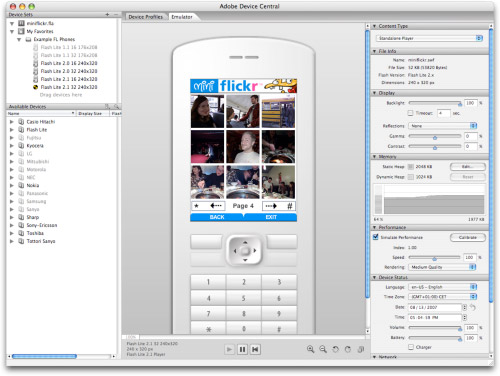
SWX and SWX RPC advantages for mobile development
SWX RPC is the only RPC solution for Flash Lite and, beyond that, it works really well and is simple to use. Here is a summary of some of the advantages of the SWX data format and SWX RPC for Flash Lite development:
- Native; data is ready to use the moment it loads as native ActionScript objects.
- No processor-intensive parsing, etc.
- No plumbing code for deserializing requests.
- Public gateway and APIs for mobile mashups.
- Only RPC solution for Flash Lite.
- Easy to understand and use.
SWX Flickr API
As of the upcoming SWX PHP Release Candidate 1, a full implementation of the Flickr API is included in SWX PHP.
You can start playing with the SWX Flickr API right now, using the Public SWX RPC gateway. Try the methods out online using the SWX Service Explorer.
- Implements the full Flickr API, current as of August 1, 2007.
- Liberal open source license (MIT).
- Provides photo upload feature.
- Actively maintained and updated.
- Simplest way for Flash developers to work with Flickr.
Roadmap
So where is SWX, SWX RPC, and SWX PHP going?
I realized today that I was being overly ambitious with my plans for version 1 of SWX PHP.
For one thing, I had considered getting the Flash 9/AVM2 version of SWX PHP ready in time for version 1 but that involves writing a whole new assembler. I've now decided to leave this for after the 1.0 release so that I can instead concentrate on getting a polished and stable 1.0 release of SWX PHP that includes all the learning materials, screencasts, etc. that you need to get up and running with SWX RPC.
SWX PHP already fills a gaping void in RPC solutions for Flash Lite and getting SWX PHP to version 1.0 is important in getting development houses to adopt SWX PHP for production of Flash Lite applications.
Also, the SWX assembler (the bit that creates the SWX SWF files) in SWX PHP is extremely stable and has been for a while and I want the Flash 9/AVM2 version of it to be as stable when it goes into version 1 but that's not realistically going to happen in the timeframe that I have in mind.
So, instead of working on yet another implementation, I'm going to spend the next few weeks working on the Internet Drafts for SWX and SWX RPC and on documenting the heck out of SWX so that others can create implementations of SWX RPC (in fact, if anyone is interested in undertaking the Flash 9/AVM2 implementation for PHP, please get in touch).
What is important is that eventual Ruby, Python, J2EE, .Net, etc. implementations of SWX RPC are all compatible and that they all adhere to the same philosophy of simplicity. (And thus, for example, do not require extensions, etc. or place other barriers in front of developers.)
So what is the eventual release data of SWX PHP? I'm going to be aiming for the start of September and definitely before FlashForward Boston.
I will be releasing Release Candidate 1 of SWX PHP this week so keep any eye out for that on this blog.
Also expect a number of new screencasts in the coming days, showing you how to work with SWX PHP and the various APIs and how to create mobile applications using SWX PHP.
Come September, I will be embarking on a crazy schedule of conferences, starting with FlashForward Boston to present my session Let's talk about SWX, baby!
The conferences I'll be presenting SWX at include MAX Chicago, FlashForum Conference (Germany), MAX Barcelona, FITC Hollywood, Flash on the Beach (Brighton, UK), and MAX Japan.
I hope I'll get to meet and talk with some of you at these conferences. If you see me, do come up and say hello and ask me for a SWX Moo card and a SWX Moo sticker :)
Comments
by Ronny on 2007-08-16 18:53:56
by What is SWX, how does it work, and where is it going? at SWX: SWF Data Exchange Format on 2007-08-16 15:18:45
by Ruben Müller on 2007-08-16 18:22:11
by Aral on 2007-08-16 18:58:57
by noCreativity.com » Blog Archive » SWX is vanaf nu WEL een optie! on 2007-08-16 19:19:01
by Nate Chatellier on 2007-08-16 23:56:08
by Thom Shannon on 2007-08-17 00:51:17
by C4RL05 on 2007-08-17 07:20:29
by Kelvin Luck on 2007-08-17 08:25:58
by Jai on 2007-08-17 10:24:23
by Aral on 2007-08-17 10:28:35
by Aral on 2007-08-17 10:34:42
by Aral on 2007-08-17 10:41:59
by Kelvin Luck on 2007-08-17 11:53:05
by SWX PHP support for Flash 6 at on 2007-08-19 08:35:40
by David Arno on 2007-08-20 10:42:25
by SWX Showcase: Three Flickr experiments by Eugene at on 2007-08-21 08:51:37
by Filo on WP › SWX Showcase: Three Flickr experiments by Eugene on 2007-08-21 09:22:41
by David Arno’s Blog » Blog Archive » Anyone for SWX? on 2007-08-22 21:08:07
by Just Flashing - Today’s Top Blog Posts on Flash - Powered by SocialRank on 2007-10-01 09:03:02
by James on 2007-10-17 02:59:50
by Aral on 2007-10-17 09:19:21
by Dinah Puckett on 2008-06-18 01:57:13
by skhan on 2008-01-19 10:40:06
by camille moussette on 2007-11-24 15:45:13
by Brendan on 2008-01-18 13:04:16
by Nit on 2009-09-08 05:12:15
by Nit on 2009-09-08 05:13:57
by Karay Akar on 2010-03-17 01:31:00