
My dad, of all people, emailed me to tell me that my blog wasn't loading correctly in Internet Explorer on Windows. Thanks for letting me know, dad, you rock! Now stop using IE! :)
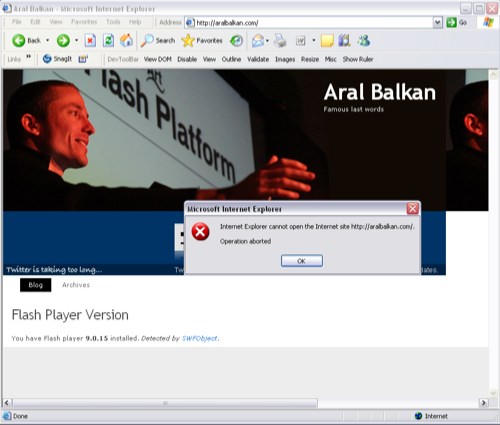
I was getting the following error: "Internet Explorer cannot open the Internet site . . . Operation aborted". A quick google turned up a blog post by Eoghan O'Brien that outlined the issue and why it was happening:
The problem is you can’t append to the body element from script that isn’t a direct child to the body element. It can be fixed simply by putting defer=”defer” in the script tag.
According to the W3C, the defer attribute:
When set, this boolean attribute provides a hint to the user agent that the script is not going to generate any document content (e.g., no “document.write” in javascript) and thus, the user agent can continue parsing and rendering.
This immediately made me suspect that the issue involved SWFObject and a quick test confirmed this.
The fix, as stated in Eoghan's post, was to put defer="defer" in the script tags whenever I was using SWFObject. I've only change the SWF that are currently displaying on the front page. I guess I'll have to go through and change every SWFObject in every post. What a pain. In the meanwhile, viewing older posts with Flash content in it may still kill IE (how I wish I could). Which brings me to a small request:
Dear reader, if you're using Internet Explorer at the moment, please do two things: One, exit it. And two, uninstall it. Oh yeah, you can't uninstall it because Microsoft owns your computer not you. OK, so at least don't use it. Here are some yummy alternatives: Firefox, Safari (hey, why not get a Mac while you're at it and enjoy the easy life?), and Opera.
Remember: Friends don't let friends use IE.
The SWFObject/Internet Explorer conflict and workaround. Oh yes, and please stop using IE! article by Aral Balkan, unless otherwise expressly stated, is licensed under a Creative Commons Attribution-Noncommercial 2.0 UK: England License.
Please stop using HTML.
Hmm. Weird, I’m using SWFObject over on podcast.com with no problems in IE.
Could it be because you’re calling the swfobject.js three times in your headers through plugins?
just a thought. but if I do now see this error you’ve had, I’ll know what to do. ;) ta.
—-
btw : on a totally different note, soon I hope to find some great flash/flex/apollo devs to have a crack at something like this, which uses all our opml and rss ;)
http://podcast.com/swf/directory_feed_player_pod.html (unfinished) ;)
I had a problem recently with IE and spaces in an ID tag, which was an error in it’s self but the way IE handled it with flash was very strange…
I get random reports now and again of this happening, but I’m not sure it’s just a matter of writing the content into a nested div – I think it’s usually related to people not properly closing their html tags, or sometimes putting the so.write() call inside the same div that they want the swf to go into… so you might check those out as well.
I did some testing, and I’m not sure that blog post you linked applies to this situation.
I made a test page here:
http://blog.deconcept.com/swfobject/swfobject_ieabort.html
Which has the flashcontent div inside another div (i nested it a few times actually) and then has swfobject write into that div, and I get no errors in IE7.
Also of note: SWFObject doesn’t use document.write – it just uses innerHTML, which should be safe to use any time you want, as long as the element you are injecting stuff into has completely loaded.
I’m thinking that there may be some conflict with another script on your blog – maybe something is trying to parse the whole html document and is causing IE to crap out since the document is changing at the same time this other script is parsing it? (I’m thinking maybe something like a getElementsByClassName or other function that might have to scan the full page… but this is just a guess.
Hey man,
Just took a look at your SWFObject script at the top of you page and your in innerHTML call aren’t escaped. Might not be the issue, but would be worth switching over just in case.
Bad “);
Good “);
Might be worth a try. I find the first step to fixing issues is always validating.
Well that didn’t quite show up how I was hoping.
Your greater than and less than characters aren’t escaped in the innerHTML for showing the flash version the user has.
Hey guys,
Thanks for the tips and insight. I just deactivated the plugin that was causing the redundant include (a leftover from when I was testing it.) The defer trick seems to have worked so I probably won’t investigate further at this point (got SWX to do!) :)
DIGG IT:IE doesn’t leave a father read his son’s blog!
>The defer trick seems to have worked so I probably won’t investigate further at this point (got SWX to do!)
That’s what we wAnt: ppl not bothering/knowing about the simple inner workings of their html-rendered blog templates invent new “kick butt” formats for data exchange.
brave new world, strange times.
off taking a piss ;)
I have loaded Firefox and I can reach your blog without any problem. Using IE I still continue having problem to load your blog, although what I see before it abondones to load has improved compared to what I experienced this morning.
As I use SWFObject on nearly every web based project I really feared this problem would come back to haunt me.
First I suspected it would be the urchin tracker doing some weird stuff, but that isn’t it.
Then I tried blocking the second swfobject.js that gets loaded, but that wasn’t it either.
After that I presumed mootools was the culprit. It seemed to be, but it really wasn’t. It is just a dependency for videobox.js. MooTools doesn’t seem to be used anywhere on your frontpage except in videobox.js
Upon closer inspection it seems to be related to the combination of swfobject.js and videobox.js.
Videobox tries to add an eventlistener to the “domready” event.
After that it searches every “a” tag on the page that has a rel attribute beginning with “vidbox”.
It also seems to create quite a few elements.
As far as I can see there is no such element on the front page of your blog.
In conclusion: It might be a good idea to remove the link to the videobox.js file.
Furthermore I recommend removing the now unused mootools.js link, removing the duplicate SWFObject link and upgrading to SWFObject 1.5.
I’m using Windows 2000 and when trying to access the blog in IE6, I too get the “Operation Aborted” message. Clicking the OK button loads the “Page cannot be displayed” page… Loads fine in Firefox (which is my default browser ;-)
@Kristof: *Doh* That would be it, then. I only just installed Videobox (the plugin version for wordpress) to play around with. OK, it’s history :)
@Jason & dad: Could you guys try again on IE (after clearing your cache) and let me know if removing Videobox did the trick. It was working for me on IE even before removing that but it sounds like a time-related bug and may trigger or not based on the difference in download speeds.
I thought you’d done that on purpose ;)
Seems to work on Vista:
* msie7
* ff2.0.03
* op9.20
Seems to work on XP virtual machine:
* msie6 (#page too wide, probably a glitch in css)
As far as I remember innerHTML isn’t a great thing to use anyway as it’s not a proper web standard (although all browsers support it).
Best practice is to use appendChild() instead, e.g.
//the text to write out
var mystr = “This is some text to write into the div flashPlayerInfo”;
//the div to write out to
var outputdiv = document.getElementById(”flashPlayerInfo”);
//clear anything that’s already in the div
if(outputdiv.firstChild) outputdiv.removeChild(outputdiv.firstChild);
//create new paragraph node
var newpara = document.createElement(”p”);
//add the text to it
newpara.appendChild(document.createTextNode(mystr));
//write out to the div
outputdiv.appendChild(newpara);
//clean up
outputdiv = null;
Obviously that’s a lot more lines of code but you can wrap it up into a function for easy re-use. It also avoids any issues around having to escape() special characters in your output string as createTextNode does that for you. Only caveat with that is if you want to use in your string it will escape that for you so you have to use the unicode version (\u00A0) instead.
On a separate note (but also to do with the crapness of IE) I found out the other day that if you store a reference to an element in a var, IE does not automatically remove that var from memory – so when doing AJAX pages in particular it’s important to explicitly clean up all vars that reference document elements – otherwise IE will start hogging all your RAM! See code above which does exactly that…
woops – the last sentence of the penultimate paragraph should read:
“Only caveat with that is if you want to use in your string”
I did not clear my cache but now I am able to reach to your blog witout any problem both from firefox and IE.
Thank You
Pfew, I was getting worried I needed to change all my SWFObject sites!
[...] I’d like to take a moment to apologize to all of the visitors to this site who are using Internet Explorer. It was recently brought to my attention by Dan (Faken) of Pixel2Life that one of my pages had a rather severe bug on it. This bug would throw an error to any IE user, and then kick them out. The problem, which turned out to be a conflict with the swfObject and a lightbox plugin that I was using on the website, has now been fixed. For more information on the bug and how to fix it, visit Aral Balkan’s Blog. [...]
The solution is not eliminating videobox.js. That is not a complete solution, just a workaround.
In our case we need it to run mootools and videobox , we found out that the solution is to create the SWFobject variable on the “onDOMready” event. That did it for us.
here is an example:
[code]
//
[/code]
We find that the interaction between mootools and SWFObject to be quite difficult. It is like learning to code again.
I have had the same “operation aborted” problem with the **** IE explorer.
I have seen that the swfObject has troubles with the mootools javascript…
I have removed that…
now the site works
Ganar…for some reason the code you posted isn’t displaying for me. I was wondering if you could try explaining your solution again as I am running into the same problems using videobox.
Thank You
Just a quick heads up for y’all – we were experiencing the same issue and eventually pinned it down to the slimbox include. I assume its the same root problem as you guys were having with videobox. Anyway I moved the include line for slimbox to right before the closing body tag … and that seems to have resolved the issue for now.
Hi
having same problems with lightbox vs swfobject cooperation. Unfortunately it’s crucial for my project.
Niether
->moving initLightbox() to the end of body tag
nor
->
has done the trick for me so my last hope is to see Ganars solution ( to create swfobject variable on the “onDOMready” event ) but there sth wrong with the code.
I’d be SO grateful if somone could help me out ( i’m not really a coder ) – how to create a swfobject variable on the “onDOMready” event.
A simple piece of code and where to put it would be more than enough!
[...] “Die Seite …. kann nicht geöffnet werden. Vorgang abgebrochen. ” “Internet Explorer cannot open the Internet site … Operation Aborted” Grund: unbekannt, jedenfalls für mich. Zumal in Firefox und Opera keine Probleme auftauchen. Na ja, Google ist ja dein Freund… man ist nicht der einzige mit den Problemen: Der Tipp auf http://aralbalkan.com/912 hat zwar etwas geholfen, aber nicht wirklich. Im Internet Explorer wurde danach nach der Flashplayer-Installation verlangt, bzw. dieser nicht erkannt. Geholfen hat ein FAQ-Eintrag auf der Seite der SWFObject-Macher: Code (javascript) [...]
can any body please tell me how to use swfobject? on my popup its no working.
thanks in advance
After two hours of banging my head against the table, i read the solution her!
Thnx
I have had the same problem with swfobject a slimbox. And the problem it isn´t between mootools and swfobject, it is with slimbox. The defer=”defer” works but only if you put it with slimbox. With swfobject doesn´t work.
[...] http://aralbalkan.com/912 podemos ver mas detalles del [...]
THE SOLUTION:
SWFObject conflicts with mootools. This is the fix:
window.addEvent(’load’, function(){
var movie = new SWFObject(”movie.swf”,”mymovie”,”400″,”200″,”8″, “#336699″);
movie.write(”flashcontent”);
});
Instead of:
var so = new SWFObject(”movie.swf”, “mymovie”, “400″, “200″, “8″, “#336699″);
so.write(”flashcontent”);
Sanders solution works, but now I have always a short delay before flash appears. The no-flash-GIF shows up for a second before flash appears. Any ideas for that?
Use window.addEvent(’domready’ instead of load. The delay is shorter, but still there. Working on a fix
More one this, see http://www.rednas.be/news/43/swfobject-internet-explorer-error-fix
The above solution does not work for me, I am experiencing conflicts using jquery lightbox and swfobject.
Thanks a billion my friend for the interesting post, thanks everyone who brought up a solution (the solution from sander worked great and he submitted it the day of my birthday (dec 6th ) !! ).
Has anyone experienced this problem with the Modx snippet version of SWFObject? I’m not sure how to implement these fixes given the code differences. Thanks!
http://modxcms.com/SWFObject-1815.html
http://modxcms.com/forums/index.php?topic=21614
This fixed the problem with Modx:
See http://modxcms.com/forums/index.php/topic,21791.msg134386.html#msg134386
Hi,
I just implemented the SWFObject to my website but now my popup windows are deactivated and nothing happens when you click on buttons? I have been searching for a fix but no joy. Any help would be much appreciated.
I moved the include line for slimbox/lightbox/mediabox to right before the closing body tag … and that have resolved the issue for now. This is Mikeh’s solution. Thanks Mike!
OH MY F*CKING GOD!!!!
You are my hero!!
For like… months I’ve tried to get this conflict out of the way and this little article of yours fixed it with the use of two damn words!!! The SWFobject script interfered with my mootools library jamming my whole webpage and resulting in an complete IE crash. I love you man!
Thanks,
Fabio
good god man, is it really that easy? I just dropped it in and am not seeing the problems. Thought it was a conflict with jquery, but i guess it’s just M$ being their usual crappy selves.
Thanks very much for the solution!
I was running into this same error. I am running MediaBox and SWFObject1.5 and changing how the mediabox is executed seemed to do the trick. Change it from “domready” to “load”.
Mootools explains that domready will execute after all the html is loaded (not necessarily images though) while load will execute after all images and html is loaded. http://demos.mootools.net/DomReadyVS.Load
I’m not using mootools and still experience problems with SWFObject and IE. I tried to add defer=”defer” and I get something odd. I have a preloader that’s loading my main movie and I pass the preloader to the swfobject. And if I add defer=”defer” to the javascript tag then the preloader is not displayed but the main movie still loads.
I had the same problem developing in Flex and then trying to use the History Manager + history.js and historyFrame.html. I didn’t need the history manager, I just let flex build the html page for me and then loaded all the files from the “build-release” and then switched from the canned html page to the swfobject script. I forgot to take the history behavior and frame out. I kept getting a frame and couldn’t figure out where it was coming from. Then I deleted the script reference to the history.js file and viola, no more problems.
So, I have been using swfObject 2.0 and everything works fine now :)
I’ve had the same problem. I figured out that the IE crashes if you try to append a tag to the bodytag and the scripttag isn’t a child of body too.
This crashes:
TESTSEITE
TESTSEITE
var divTag = document.createElement(’div’);
document.body.appendChild(divTag);
This works:
TESTSEITE
TESTSEITE
var divTag = document.createElement(’div’);
document.body.appendChild(divTag);
However, I explained that a bit longer on my Typo3-Blog on http://www.typo3-scout.de. But sadly, it’s written in german.
Sorry for the last comment! Html is not working. Please look at http://www.typo3-scout.de/2008/05/14/js-error-in-ie-totalabbruch/#more-15 to see the code…
If you are attempting to use this on an .aspx page that also uses a ComponentArt object you will have the issue described at the top of this page, but worse – it will refuse to load in IE7.
After reading through the replies here I changed the last line of code in the videobox.js file from “window.addEvent(’domready’, Videobox.init.bind(Videobox));” to “window.addEvent(’load’, Videobox.init.bind(Videobox));” and that did the trick for me.
IE is the Devil.
hi, if you are having problems with video in your posts, try my new plugin:
http://jwmpplugin.wordpress.com/
defer thing didn’t solve the problem. I dont really know dom scripting but that option didn’t seem to work either. The only thing that did seem to work was adding the javascript call right before the closing body tag. Thanks to whoever suggested that workaround.
In regards to IE isn’t it time we quit going out of our way to support the crappy browser. How will the masses know the browser (IE) is the problem if we keep creating workarounds/hacks.
I can’t seem to view my facebook profile. The profile comes up and then right after this error box with, “Internet Explorer cannot open the internet site. Operation aborted”,pops up as well. I click okay and it brings me to the page saying “web page can not be found” or whatever…Its been a whole day since I looked at my profile and I know its happening when others click to see my profile and can’t. Please help!!!
All of this has been somewhat enlightening. The best explanation of what exactly is going on here that I’ve found yet: http://www.garyharan.com/index.php/2008/04/22/internet-explorer-cannot-open-the-internet-site-operation-aborted/ And no – I’m not Gary.
I fail to see why people should stop using ie because some people cant make stuff that works right. There are things that work in ie that don’t your in other browsers to but i don’t hear you saying stop using them.
Hey guys.
Ive spent HOURS and HOURS and HOURS trying to fix this.
I did everything any1 could think of!
On my page, i have at least 10 scripts. mootools, lightbox, and some other marketing scripts.
The FLV Video was loading and working 100% fine on Firefox.
but it wouldnt load on IE!
When i added the defer=”defer” something else would stop working.
The window.addEvent(’domready’ and ‘load’) did not work…
anyhow, nothing worked!
THE SOLUTION IS!!!!!!!!!!!!!!!!!!!!!!!!!!!!!!!!!
Take your all the way to
OUT OF THE BODY TAG!
This is one of the reasons that it doesnt work.
Now…
Put the script inside the HEAD TAG!
function startvideo()
{
var s1 = new SWFObject(’player.swf’,'ply’,'210′,’170′,’9′,’#FFFFFF’);
etc…
IMPORTANT!!!
Now on the Body tag, add the following:
AND THERE YOU GO!
cheers!
hey my code didnt show up properly!
So after u move your script to the head dat and add the funcion.startvideo()
go to your body tag and just next to where it says body add onload=”startvideo();” >
I ran across another cause of this problem: I had my javascript accidentally placed within tags. This attempted hyperlink is ignored by all other browsers, but it causes this error in IE.
Hope that helps someone out there as clueless as me…
Oops. Let’s try that again. I had my javascript accidentally placed within <a> tags.
How does one incorporate this fix into an html file?
window.addEvent(’load’, function(){
var movie = new SWFObject(”movie.swf”,”mymovie”,”400″,”200″,”8″, “#336699″);
movie.write(”flashcontent”);
});
I am using the Videobox application and don’t know what the “movie.swf” and “mymovie” variables are (they must be in the compiled videobox.js file).
I used the “defer” suggestion but it didn’t work on swfobjects.js. I used it in mootools.js and while Videobox still doensn’t work in IE, this hack did allow each post in the blog using this javascript to load.
I am not a programmer so anyone who knows how I might incorporate this for the Videobox application, please explain in non-techie details or write down the specific example.
Thnx you just saved me another worry with IE… which i only start if i really have to… but with all the buggy issues that’s still quit a lot ;)
None of your methods worked for me with multiple swfobject calls on one page so..
1
function video1(){
var s1 = new SWFObject(”player/player.swf”,”ply”,”300″,”243″,”9″,”#FFFFFF”);
s1.addParam(”allowfullscreen”,”true”);
s1.addParam(”allowscriptaccess”,”always”);
s1.addParam(”flashvars”,”file=/video.flv&image=images.jpg”);
s1.write(”videome1″);
};
2
function video2(){
var s1 = new SWFObject(”player/player.swf”,”ply”,”300″,”243″,”9″,”#FFFFFF”);
s1.addParam(”allowfullscreen”,”true”);
s1.addParam(”allowscriptaccess”,”always”);
s1.addParam(”flashvars”,”file=/video2.flv&image=images2.jpg”);
s1.write(”videome2″);
};
Now they are all independent functions and will be called after the page has loaded, No conflicts with lightbox, works on IE6, 7 and all the better browsers.
Silly me, tags..
Missed off
body onload=video1(); video2();
div id=videome1
thansk oyu goog. çet
sohbet sitesi
çet
I’m getting the same error with my own blog. I was researching how to fix it and your site came up. I have no idea what you guys are talking about! I wish I did so I could fix it. rofl.
We have about the same problem on a wordpress website…
“this method is not accepted by this object”
Only on IE7 and IE8beta , not on FF
FYI, for anyone having a related problem involving SWFObject error “Object doesn’t support this property or method” when using External Interface.
Here is the “official” adobe solution:
http://kb.adobe.com/selfservice/viewContent.do?externalId=kb400730
They have 2 solutions, one didnt work for me, the other did work.
What file exactly would I put this tag?
Excuse me, this tag: script type=”text/javascript” defer=”defer”
i downgraded from SWF Object 2.1 to 1.5- now it works…
ups- actually i dont know if the downgrade worked. what really helped was to put the whole thing (script tags) out of the header into the body
couldn’t help that stupid Mac plug at the end eh. I’m supporting a Windows user that just got a Mac for the 1st time a couple months ago… easy life ? FAR from it. That, and he could have purchased 4 PC laptops for the same price as his one Mac. Yikes.
thankss
While you’re at it: stop using Flash, and create websites that degrade gracefully…
Hi,
I added the defer=”defer” tag and now it’s up and running.
Tanx.
“(hey, why not get a Mac while you’re at it and enjoy the easy life?)”
ruined everything else you said for me
Please help me i do not know anything about programming…
I am suffering the same problem with my blog Guruofsoftwares.blogspot.com..
help me … how properly use HistoryManager for ie
I had this problem also.. the defer trick was not a solution as it only fixed it intermidently.. I found that the problem was due to a conflict between swfObject and prototype.js.. Removing prototype fixed the issue..
I am sooooo with you.. IE is the bane of any developer’s existance. I HATE IE. It’s the only browser that can take a 5 min fix and make it 5 hours.
Thanks for the solution :-)
[...] пофиксено в рабочей версии будет и в stable release. Но эти траблы с IE7 – это нечто. Да, знаю, Aral Balkan запостил это еще в 2007 [...]
..many users are still using the problematic version 6 of ie !
Its unbelievble.. who ..s gonna “wake up” these people ? :p
IE version 6 it’s by, its-elf a “problem generator”, in terms of compatibility and logic, for every designer, developer etc etc ! :p
Since that exist IE version 7 & now IE version 8 ..someone should really strongly recomment to every body using version 6, to sipmly, please, St0P uSinG iE 6 :(
Please note that outta there are better, compatible & more secure browsers such as : ie8, firefox, safari, chrome, opera, netscape navigator, k-meleon, konqueror !
Oh man, I should’ve read your post like 4 months ago!!! It’d have saved me so much grief. I’m not a geek or anything of that sort. So imagine my excruciating pain! I’d bought an expensive flash object back in December 2008 called “Flash Player Aleo” for my blog. It was around Xmas time; this explains why I spent 60 bucks on this thing: I must have had one too many! But this thing is cool and looks like an Ipod… And I just wasted 4 months of my life trying to figure out why the it never showed on my blog. Until a few days ago when I downloaded Firefox, repeated what I kept doing with IE and voila! But I still held hope for IE. So I followed various recommendations and went to Microsoft to download something called “subInACL” and reinstalled Adobe Flash. And I tried to see my object: Nothing! Very intrigued I googled one umpth time “swf object doesn’t show on ie” and here I am, reading your incredible advice: “Friends don’t let friends use IE”–uncannily, this is what I started telling friends yesterday!
Hi Aral, good day to you. I’m now having problem with what you had but I can’t find the SWFObject that you mentioned in my html scripts. Worst of all, I am not a web designer and really need your help or anyone here you can tell me how to change my script. Thanks a zillion! – william (fotomalaysia@gmail.com)
You can work around the issue by moving the Lightbox tags from the section of the HTML to the very end of the page code, just before the closing tag:
Worked for me! YAY!
[...] conflict with IE [...]
Thanx a lot for this post, it’s help me with this issue in my website.
Cheers from Chile.
So I tried the defer=”defer” it succeeded in allowing the page to load but once I clicked on links, the page froze/ the page went dead. No idea.
hacked my weemee
hey man,
You’re right, I hate to do websites, blogs works for ie, mainly ie6. It’s terrible…
I had this problem with ie6 + swfobject too, but in my case it was because of the tag I used. In ie6 you can’t use a self closing tag for like so so you must add the closing tag yourself
More details on the SWFObject FAQ page, point 4
http://code.google.com/p/swfobject/wiki/faq