
Daniel Dura on Apollo
Some notes from the session:
- Project is in early development
- Individual items/features subject to change
- Accurate as of today (he's showing the latest build from last night)
- Not mock-up, etc. Everything he's showing us is working version
What is Apollo?
Apollo is a cross-OS runtime for building RIAs. Leverage skills in Flash, Flex, HTML, Ajax to build and deploy desktop RIAs.
Benefits
Targetting the Apollo runtime as several benefits:
- Run across multiple operating systems with any additional work by the developer
- Apps are easier to develop. Leverage existing web technologies instead of
- learning lower-level languages such as C, C++. (i.e., simplicity)
Build applications using the following technologies:
- Flash/Flex/AS
- HTML/JS/CSS/AJAX
- Combinations of the above
- PDF can be used in any application
Scripting support:
- Depends on container being used
- AS3 - Flash/Flex
- JS - HTML/CSS/AJAX
- Cross-environment communication and scripting will be possible
- Complete access to Flash Player and HTML DOMs and APIs
For example, you can embed Flash into a JS container and traverse the Flash DOM from JS. You can walk the DOM in both JS and Flash, transparently.
APIs:
Rich set of frameworks and APIs:
- Apollo-specific APIs provided by the Apollo runtime and the Apollo framework (e.g., file system API.)
- Flash Player-specific APIs provided by the Flash Player and the Flex Framework (as well as other AS-based libraries and frameworks.)
- HTML/Javascript-specific APIs provided by the HTML and JavaScript engines. This includes external JavaScript libraries like dojo.
Application stack
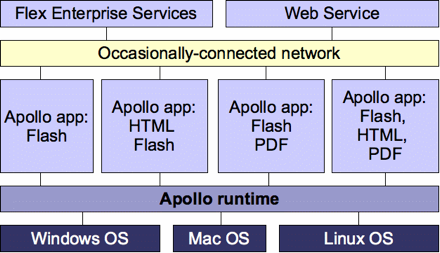
Apollo APIs
- Offline/occassionally-connected (like Macromedia Central)
- Network:
- HTTP
- XML-RPC/SOAP/REST-based web services
- Binary and XML sockets
File I/O
- Local storage/settings API
- Custom chrome
- Shape
- Alpha
Desktop Integration
- Installation: A packaging format (.AIR). Custom format. Contains all assets for application in a single file. Can be emailed, downloaded, etc. Single-click install. Download and install Apollo runtime.
- Application shortcuts will be placed in the correct places for the OS (eg. in Start Menu on Windows.)
- Drag and drop
- Clipboard
- Launch native applications: e.g., Building a photo-upload tool and launching iPhoto.
- Cross-application communication: Make it easy to expose the APIs of your applications so that other applications can take advantage of them. Desktop mashups.
- Notifications
Demos
Danny's got a couple of AIR files (the installer) and the Apollo runtime (Apollo.msi on Windows) on his desktop.
Pixel Perfect by Christian Cantrell. The installer looks like it was created in Flex. Creates shortcut on desktop. Installation was simple. It's a ruler application. Very cool/simple app. (I use Grab on OS X for measuring areas of the desktop but this looks cooler!)
In Task Manager it's taking up 0 CPU 14,256K memory at the moment. (It has its own process in the Task Manager.) If one Apollo application crashes, it won't affect any other Apollo applications.
Users really don't need to know that they're running Apollo apps. It's just like any other app.
Lookup by Christian Cantrell. App that loads word definitions from a web service. Cool little application. Apollo will allow people to build small desktop applications easily.
File Browser. It's a OS X-style file browser built in Apollo. Neat.
He's now showing an application that loads in your iTunes music and plays them back. Flickr photos based on song that's playing. Cool 3D spectrum analyzer.
Video Demo: Full-screen video of an IMAX Deep Sea video. It's very high quality.
Building a sample Apollo application
Danny is now building an Apollo application in Flex. Basically, it's like any other Flex 2 application with the following differences:
- Add a namespace for apollo (http://www.adobe.com/2006/apollo)
- Use the
- Create an Application.mxml file. This is the manifest file that describes the application
Inside the ApplicationWindow, he puts some regular Flex components (Button, Label).
Application.xml manifest file:
[xml]
You can use command line compilers to compile Apollo and create Apollo installers. (You don't have to use Flex Builder 2.)
Timeline
- Public beta by the end of 2006
- Version 1 release: Sometime in 2007
Links:
There's a question:
Are there APIs for accessing databases?
No object-relational mapping. They're exploring data support. You can write AMF objects to the file system. AMF is the format of Flash Remoting.
Apollo looks really great. Can't wait to try it out with Flex 2. It's going to open up desktop application development to a large number of web developers.
Comments
by Neil on 2006-09-13 11:55:17
by Dominick on 2006-09-12 19:46:30
by Ted Patrick on 2006-09-12 22:37:52
by Ozgur on 2006-09-12 22:59:06
by wendelmaques » Primeiro código XML de definição de aplicação do Adobe Apollo on 2006-09-12 23:55:02
by Tmeister on 2006-09-13 02:10:37
by Ryan Stewart - Rich Internet Application Mountaineer » The Best Apollo Information Out There on 2006-09-13 04:16:49
by .:: klr20mg ::. Una dosis diaria de …. » Blog Archive » Apollo, Estamos cerca del Beta publico on 2006-09-13 05:25:46
by » Universal Desktop Daily - Wednesday, September 13, 2006 - Flashforward | The Universal Desktop | ZDNet.com on 2006-09-13 07:16:37
by Matt Voerman on 2006-09-13 08:14:43
by GAMEDevelopment | Hannes Moser » Blog Archive » Apollo on 2006-09-13 14:14:49
by Vixiom Axioms » Apollo Features on 2006-09-14 00:40:48
by tousandoaks on 2006-09-14 01:39:52
by FLAshot on 2006-09-14 10:00:09
by Martin on 2006-09-14 12:54:26
by 10 Things That Will Make Or Break Your Website: #9 - Apollo at Aral Balkan on 2006-09-28 01:21:49
by Flashforward Blog » Blog Archive » Flashforward Austin: Recaps and Reviews [Updated] on 2006-09-28 16:44:21
by jahepi on 2007-01-02 19:25:29
by Apollo llevara la web hasta la luna « JuniHH Blog on 2007-03-20 21:05:37
by J Marziani on 2007-06-14 21:33:04
by J Marziani on 2007-06-15 15:13:58