
1 Jul 2006

Getting ServiceCapture and Flex Builder 2 to kiss and make up

The Help documents in Flex Builder 2 suddenly stopped working for me a few moments ago. Remembering that the Help panel uses the Internet Explorer control to display the HTML help pages, I thought I'd shut down ServiceCapture to see if it was the culprit and, lo and behold, the problems went away.

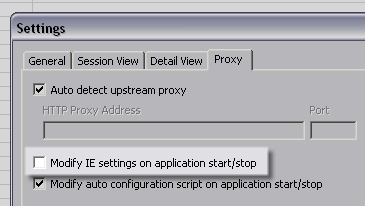
You see, by default, ServiceCapture modifies Internet Explorer's settings to use itself as a proxy so it can capture HTTP calls. If you want to be able to use Flex Builder 2's help and ServiceCapture together, you need to disable this feature. You can do so by unchecking the Modify IE settings on application start/stop option under the Proxy tab of Tools -> Settings.

Add Your Comment

Spam Protection by WP-SpamFree

Help! ServiceCapture kills Flex Builder 2 Help!
  1. I haven’t tried it, but if the help docs were pulled up in FF would that also be a feasible workaround? Or does ServiceCapture still interfere?

    Windows > Preferences > General > Web Browser > ‘Use external Web browser’ :: Firefox
    Windows > Preferences > Help > ‘Use external browser’

    In my case, I only read the docs in an external browser because of the vast amount of memory that FB2 eats. Also, I’ve been wondering about the “Help Server” option and if a small-medium team without much experiene with flex would benefit from a dedicated. Running it locally shouldn’t be too demanding, right?

    James Lyon
  2. James.

    Setting the external browser to firefox fixes the issue for me (while using service capture).

    This had been bugging me for some time too ! :)

    Cheers,

    Aran

    Aran
  3. [...] Months ago, Aral Balkan blogged about Service Capture not working with Flex Help and also gave a possible solution. (link) His solution was to uncheck ‘Modify IE Settings on Application Start/Stop”. Unfortunately for me, I didn’t want to uncheck that setting. I like that when I start Service Capture, it automatically sets up the proxy on open browser windows. Luckily, IE6 proxys traffic for “localhost” but doesn’t for 127.0.0.1. Flex Help is initially setup to run from 127.0.0.1, hence, missing Service Capture. Therefore, going into Flex Builder -> Preferences -> Help -> Help Server and making the Host Name: “localhost” and the Server Port: “57266″ allowed me to leave ‘Modify IE Settings on Application Start/Stop” checked and still use Flex Help. I was happy… [...]

    Sam Shrefler » Fixed - Service Capture + IE 7 + Flex Help