5 Jul 2010

The 3 MiFi: 5 lights, 3 buttons, 0 clue?

3mobilebuzz.com contacted me before my talk at WebDirections @media to see if I wanted to try out the Three MiFi unit and blog about my experiences (don't confuse this with the MiFi that's sold outside the UK, which is known as the Novatel Wireless Hotspot and is notoriously difficult to find here.) Having just lost the T-Mobile USB dongle that had served me well for the last two years or so, I decided to take them up on the offer.

If you haven't had the chance to see or play with a MiFi, it's a portable WiFi hotspot that takes a SIM card and shares your mobile connection with up to 5 devices. It has a brushed-aluminium-and-white-plastic case that resembles a metallic version of Eva from Wall-E. The user interface consists of three little buttons on the side and a screen with five colored icons.

At this point, you may be wondering why a device that has just one purpose needs three buttons and five icons to perform its duties. The answer, of course, is that it doesn't. The UI is the worst part of the package and it leads to a rather frustrating user experience with the MiFi in general. I can only assume that the unit was designed either by committee or by graphic designers, not product or experience designers.

One button to rule them all

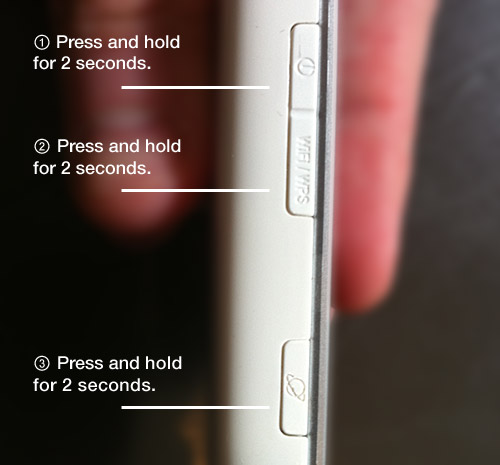
The three buttons you have to press to turn the MiFi on.

As I previously mentioned, the MiFi unit has just one function: to connect to your mobile account with Three and share that connection, via WiFi, with up to five devices. To achieve this, however, the MiFi asks you to press and hold three different buttons: one to power up the unit, one to initiate the mobile connection, and one to create the WiFi network.

This is a perfect example of needlessly exposing the inner complexity of the device to the user.

It's also a perfect example of what happens when engineers and designers worry about solving their own problems first, not the user's problems ("inside-out design" vs. "outside-in design").

Basically, if Google was a MiFi, it would give you a map of its servers and ask you how you'd like to load balance the search you're about to perform. The MiFi is a one-trick pony that needs nothing more than a single "on" button that turns it on, sets up the WiFi network, and connects to the Internet. In other words, it should "just work". Or, as Steve Krug puts it, don't make me think!

Colour me unimpressed

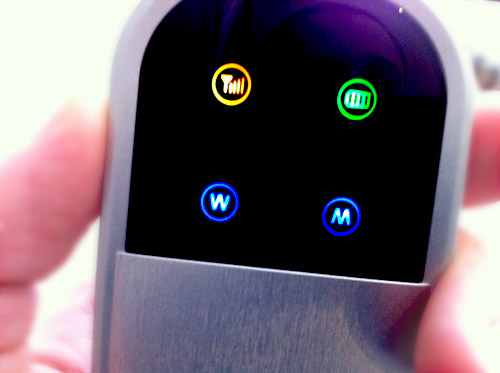
The MiFi's screen and the four colored lights/icons.

Once you've mastered the black magic of which order to press the three buttons in and finally managed to turn the device on, you're tasked with making sense of the five icons you're presented with on screen. In another design faux-pas, the icons both create expectations they don't meet and use colour as their sole semantic differentiator.

There is a static signal strength indicator which looks like a signal strength indicator but, being static, actually does not use the bars to indicate signal strength. Instead, it uses colour. (I'm not making this up.) If the signal strength indicator is red, you have low signal, if it's orange, you have a medium-level of signal, and if it's green, you have good signal. Of course, this is exactly what the bars in a signal strength indicator are for.

Similarly, the battery indicator, connection speed, and WiFi indicators display their status based on colour alone. There's also an "R" icon that apparently comes on when you're roaming (and blinks alongside all the other lights when you first turn it on).

Gutsy

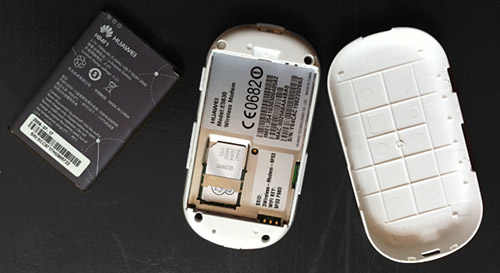
I'm your new MiFi, and these are my guts: the MiFi, batter, and back cover.

Another gripe I have with the unit is the location of the SIM card. Following the Nokia convention, the SIM card is located under the battery on the underside of the unit. This requires users to take the unit apart, remove the battery, and insert the sim card as part of their initial experience with the device. This is akin to going on a first date with someone and showing them the granny knickers you happen to be wearing. Why ruin the magic at "hello?" I don't want to see what the inside of my MiFi looks like. I want to insert my SIM card and be wowed by the magic of a data connection that I can share with up to four of my friends.

As far as actual operational functionality went, I didn't have any issues with the MiFi or 3's network. I was able to get a good signal in most places I went to in London and Brighton and when I couldn't, I couldn't. C'est la vie when it comes to mobile Internet these days with any network. The user interface issues, however, tainted the experience for me.

That said, the MiFi is a great idea and, even with its faults, it's a seductive financial alternative to purchasing different data plans for your laptop, iPad, and the plethora of other mobile gadgets in your geeky arsenal. With a single data plan and a single device, you can connect up to five devices or share your Internet connection with up to four friends. That, in and of itself, makes the MiFi a no-brainer.

If Three addresses the usability issues, the MiFi also has the potential to become a lovely experience. And it appears that they have begun to do just that with the recently-released MiFi 2.

MiFi: the sequel

I just read a review of the MiFi 2 by Ian Better that states that the MiFi 2 addresses some of the issues I outlined above. According to Ian, the new MiFi features a single "on" button. That's great news. Also, you can apparently now configure your MiFi via a web interface (this should make those of us on Macs and Linux PCs happy). Finally, the screen apparently now displays proper signal strength and battery information.

However, based on the photo of the MiFi 2 posted on Technovia and Ian's article, I still think there's room for improvement in the design. It looks over-engineered and the interface has way too much noise.

So, in my next post, I am going to design my version of the MiFi. Stay tuned for my MiFi 3 Prototype…

Add Your Comment

Spam Protection by WP-SpamFree

The 3 MiFi: 5 lights, 3 buttons, 0 clue? – A review
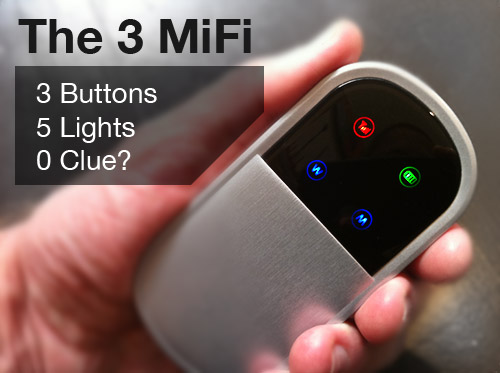
3 gave me a MiFi unit to play with and blog about. So here goes…

  1. Or you could just share you data plan via your Android phone (ok maybe not between 5 devices but at least outside of Job’s lockdown).

    Tink
  2. I’m totally down with a lot of the comments you make re: the MiFi device. But believe it or not, the actual hardware itself is a shining beacon of delight and UX awesomeness when compared with the pile of steaming that is 3′s overall customer experience when you actually try to top up credit on the damn thing.

    I take it from your post that you haven’t yet had to do this yet. I look forward to reading your comments on that particular delight.

    Here’s a little preview for ya…. the first thing you’re gonna find out is that you’ll need to create an account, just to recharge your credit. For this you’ll need the last 3 digits of your SIM card. Yeah, that’s right, the same SIM card that is currently busy delivering your internet connection.

    So that means – log off, remove battery, extract sim, read tiny digits, write them down, reinsert SIM, power up, press the multiple buttons to get your connection up, reconnect to the website, type in digits, create account, log in, see the weird “to continue click here” link…

    And then you’re into Three’s truly hellish credit top up system, known, delightfully, as My3. Oh, and by the way, don’t for god’s sake get your password wrong more than 3 times in a row. If you do you’ll find your account is “disabled for a short period of time.” How long? No idea. It doesn’t tell you – because that might actually be helpful. Seriously, Three seem to have gone out of their way to deliver utter, unvarnished, 100% pure crap. I’d like to meet their UX person, cos seriously, the guy is some kind of twisted genius. UX this poor just can’t have happened by accident. It has to be some kind of sick joke.

    Good luck… ;-)

    PS:

    Assuming you are PAYG… I would love to hear your thoughts once you’ve been through this… please DM me @johnnyforeigner Thanks

    Ian
  3. I retuned my MiFi after a week, yes all the points you raised are true, a very frustrating device to use.

    Worse however was the signal coverage, I failed to get it to work in many locations in the south west and Shropshire, even when the “3″ coverage map said their should be a signal.

    What would be useful would be a unlocked device so a variety of pay as you go Sim’s could be used.

    Scott Jordan
  4. @Tink: But I love my iPhone :)

    @Ian: 3mobilebuzz gave me a unit that had the account-related aspects pre-handled for me. However, having recently experienced 3′s South Africa-based “customer service”, I can concur that it was a nightmarish to say the least. They really have to fix this. (I talked to them for half-an-hour to try and activate the micro-SIM for my iPad before giving up.) They usually have the best prices/data plans however their horrendous customer service is a big factor for me in evaluating any future 3 purchases. (I really want to get a MiFi2 but I’m scared.)

    @Scott: Sorry to hear about your signal issues. I’ve found that all networks have their signal issues in certain places. If you want an unlocked option, perhaps look into getting an unlocked Novatel MiFi.

    Aral
  5. Wow, your understanding of how to successfully engineer a human/machine interface are becoming more and more impressive. It’s possible that some of the apple genius is starting to rub off!!!! Great stuff!!!! Well, either that or you need to fill your life with more interesting experiences and realize how tasteless it all is, and how it makes people cringe when they hear this spouting about UI and pontificating over plastic tat.

    Seriously dude, what happened to the great things you used to do with flash…?

    Supertino
  6. Dear anonymous Flash troll,

    Please go away.

    kthxbai

    Aral
  7. What’s the signal like between Brighton -> London on the train?

    I’ve tried vodafone and o2, both are pretty patchy..

    Ben Collier
  8. Dear tiresome apple shill,
    No.

    supertino
  9. See, the difference is, this is _my_ blog – you don’t have to read it if you don’t want to.

    What you’re doing is basically entering an open house while wearing a mask and then yelling at the host. It’s cowardly and rude.

    The joy of it being my house, though, is that I can simply delete your future comments. And that will be my policy for abusive anonymous comments in general in the future.

    Aral
  10. Excellent review! And I agree on all points about the design problems you’ve just experienced with this device…

    However, the idea (“share a 3G connection between 5 different wifi-enabled devices”) is great. Let’s just hope the next versions will be better… :-)

    PS About the troll — ignore and/or delete… That’s what I do on my blog as well… :)

    Michel
  11. ’0 clue?’ yes I can relate to that first hand!
    _______________________________
    After using this Hawaii device in Hong Kong for around the last 3 months, whats my view?
    1. Its a nice ‘concept device’ BUT… overly complicated to use (for whats’ actually required)
    2. Too many key combination’s, options, hold this, do that – to simply click and go
    3. Lack of mac support ‘out of the box’ if installed with ‘network three’ firmware (OK, sure their are solutions.. BUT…)
    4. You need to change sims all the time if using this device as ’3g/hspda’ WIFI and constantly swapping your sim back to your phone/device…

    Conclusion
    * My device is now gathering dust in the corner (why?)
    * I use my Nexus One or HTC desire ‘out of the box’ (with a 2.2 Froya hack on) to share my connection
    * (also) guess what? I can still receive phone calls too (WOWA)
    * (and) I don’t have to keep swapping sims (arggg)

    Conclusion
    * Just buy an ‘Android’ device! (sorry Hawaii guys!) – Just my personal ‘user’ view
    * I now use my Nexus One to share the data connection to my iPhone (shhhh) and (hopefully) my Ipad (when Apple/Carriers finish battling it out for a release in HK!)

    PS: Not to mention I can develop flex apps on ‘certain’ devices’ too (hahah) roll on ‘frash!’

    marcusjpotter
  12. Seems like someone was paying attention… It looks like they have updated it with a single on/off button and a display that isn’t 5 random lights:
    http://www.three.co.uk/Mobile_Broadband/MiFi

    I found the most frustrating thing was the instructions were wrong.

    Oh @Ben Collier, the London to Brighton reception is good most of the way. Just not around Balcombe, and 2G + trains seems to go badly (reception is fine but pings reach over 3000ms with sod all data coming through). Might be worth picking up a Three pay as you go sim and trying that out in your phone first though.

    Stephen Allred