
Brief notes on iPhone 4 resolution independence, icons, and multiple targets

The new iPhone 4 sports a high-resolution display called Retina with 326ppi resolution. While you already had to create different renders of your application icon and launch screens for the iPhone and iPad versions of your apps, the iPhone 4 means that you now have to have two renders (low-resolution and high-resolutions) of your artwork for just the iPhone version of your app. Couple this is with the iPad and iPhone versions, and the landscape and portrait versions of the launch images and you end up with quite a number of app icons and launch images to create.
If anything is apparent, it's that you should probably be working with vectors whenever possible and rending the different assets from them using some sort of automated process (actions in Photoshop work well for this. There's also an OS X app called Opacity that supports this workflow – although I couldn't really get into it when I gave it a shot last week.)
Although there are a number of ways to include the various icons and launch images in your apps, I would recommend that you go with the naming convention approach.
For example, for your application icons:
- Icon.png (57x57 – for iPhone and iPod Touch)
- Icon@2x.png (114x114 – for iPhone 4)
- Icon-72.png (72x72 – for iPad)
- Icon-Small.png (29x29 – Settings app and in search results for iPhone and iPod Touch)
- Icon-Small@2x.png (58x58 – Settings app and in search results on iPhone 4)
- Icon-Small-50.png (50x50 – search results on iPad)
One advantage of this method of working is that all you need to do is to generate your various icons (e.g., via an Action in Photoshop), drag them into XCode and you're done.
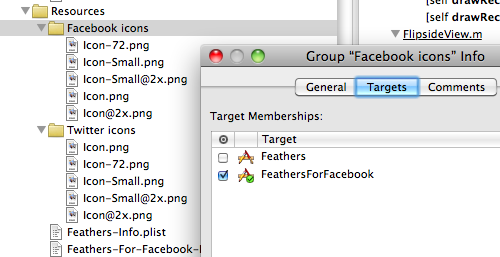
The additional advantage is that – if you're using multiple targets – it's really simple to include separate sets of icons for each target. For example, both Feathers and Feathers Visage share the same project and are simply different targets. To include the icons:
- Render your various icon files and place them in their own folder (e.g., I have folders called Twitter Icons and Facebook Icons)
- Drag the folders into XCode
- Bring up the Get Info panel for the folders in XCode and check the Target you want that folders contents to be included in.
Hope this helps.
Comments
by Niklas Alvaeus on 2010-07-02 11:21:01
by Derek on 2010-07-23 03:01:41
by Rykah on 2010-07-01 01:32:29
by billybarker on 2010-11-10 17:03:52
by Kevin Peck on 2011-03-08 21:07:11
by Vicky on 2011-09-22 01:27:18
by nima on 2012-11-14 05:56:27