
Oh noes, there's something wrong with my new Macbook Pro.
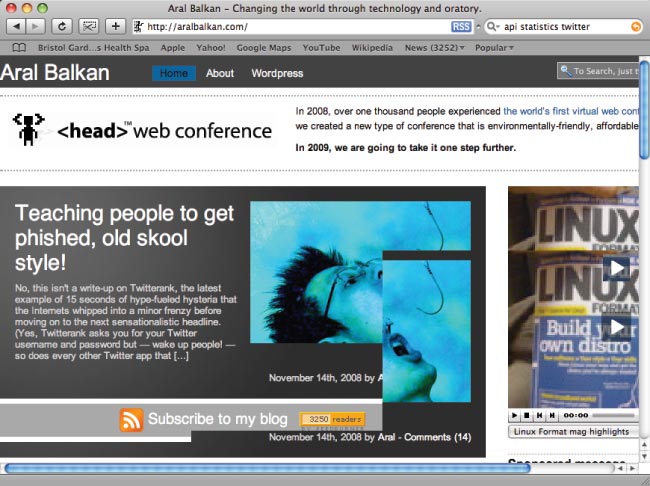
The above screenshot is how my blog looks when I scroll with the trackpad in Safari (scrolling works correctly when using the arrow keys and the glitches clear if you resize the window).
I'm getting the same tearing in TextMate and I also just saw it happen in Firefox 3.0.4, although it appears to be less frequent on that browser.
And things are flickering in certain applications — buttons, etc. The line of text I'm writing right now in TextMate is flickering.
I'm going to try restarting and hope the problem goes away. However, based on reports by other people with the same issue, it may not. (And the weird thing is, I've had this computer for about two weeks now and this is the first time I'm seeing this issue.)
I'm not too happy with the buttonless new glass trackpad, either. It freezes up briefly every now and then and sometimes will not register clicks. Reportedly, there's a software update on its way to fix the trackpad issues.
Here's hoping that Apple fixes these glitches before I start kicking myself for having spent so much money on a new laptop when I had a perfectly functional two-year-old Macbook Pro that still works like a charm and that I still love.
Have your say!
As in all things, my approach to blog posts is that they should evolve over time and your feedback is invaluable in achieving this by helping me fix factual errors, fill in details, and expand the original post.
Have you encountered this issue? Or, even better, do you know of a workaround or what exactly it is that triggers it? Leave a comment and share your insights!
The Graphics and trackpad glitches on new Macbook Pro under OS X 10.5.5 article by Aral Balkan, unless otherwise expressly stated, is licensed under a Creative Commons Attribution-Noncommercial 2.0 UK: England License.
I’ve had something similar happen (even posted about it). I can’t be certain, but it seemed to happen after I’d switched the graphics card a few times without rebooting (e.g. the power save settings to go from the 9400m to the 9600m and back). The last thing I did was switch the 9600m, reboot, and not switch back. It hasn’t happened since. I can’t be certain that it really fixed it because when it happened, the MBP was showing an uptime of well over a week and now it’s not even 5 days.
Keep updates coming if you figure anything out!
Cheers
Hi Aral, which browser do I need to use on which OS to get the design I see on your screenshot? I’ve looked at the “phishing” entry in all the latest browsers available on Windows and Linux but they don’t get me the design you portray in the screenshot here above ;-) What’s your secret?
Oh…, I C it now – U have a different look-and-feel 4 the frontpage ;-)
Thanks! I will wait with buying a new notebook until these issues are fixed then!
Hey Weyert, just a heads up, Apple released a software fix for the trackpad. Haven’t had any issues since I installed it — feels much better!
I’m having the same problem. had bought this macbook pro for a week, everything just fine, until this morning, this graphic glitches occur to me just like that. fuckin crap that i’d jumped from an overheating macbook air to this graphic glitches of mbp.
[...] tried watching TV Shows on iTunes, and it seems OK. I searched in Google and found this guy having the same problem as [...]
Aral,
Any updates?
Hey Aral, thanks for sharing the experiences with the new MBP’s. Do you happen to know whether the NVIDIA 9400M and 9600M GT cards can be used simultaneously (i.e. to drive TWO external monitors)? I can’t think of any feature I’d more like to see than the ability to drive two external cinema displays off my beloved MBP.
Hi Ry,
The latest updates seem to have addressed any issues I was having with the trackpad. Of course, I’ve also gotten used to it more as well.
One thing I did was to turn off the right-click feature when you click on the bottom-right side of the trackpad as I usually click there for a left-click. That, and I have the two-finger right-click and it’s working well.
As an old habit, I usually rest my finger on the trackpad where the button used to be and — this may be psychological — but it feels like I don’t get any interference from that since the updates so it might be intelligently compensating for it.
In short, I’m happy with it :)
Aral, I’m having the exact same graphical tearing and glitches as you, however I have one of the 8-core Mac Pro desktops. I’m running 10.5.6, and I don’t really remember this happening before that update. It looks like a graphics card issue to me though, either driver-related or (I hope not) a faulty card.
Took a 15 min break from work and came across your blog, I like your pespective on things! I can’t say agree with everything, but it is fun to read :)