
Reply to multiple email messages in Mail
You guys are great! Ninety sites have the Singularity badge on them and the number is growing every day. I couldn't be happier and yet it also means that I now have ninety emails that I need to reply to. While I've started to answer each one personally in turn, what I really need is the ability to respond to all the emails with a single message to say "Hey, I got your email, thanks. You'll be among the first to know what Singularity is in the next few days!"
I've been tagging messages with the label "Singularity Badges" in GMail as the emails were coming in (note to self: next time, also reply to the message at this point and they won't pile up!) So I thought I'd fire up Mail app, select all the messages with the label, hit Reply and Bob's your uncle.
If you've tried yourself in the past, you are probably aware that Bob is most definitely not your uncle! (The reply option is grayed out in Mail when there are multiple messages selected.)
So if you want to work this way, you have to write some AppleScript.
Being an AppleScript newbie, I was happy to see that Jake Albert had already done most of the work for me and shared his solution on Mac OS X Hints. I started with his code in Script Editor and applied the follow-ups suggested by Peter Bukowinski, Matt Harris, and Tom Wible. Instead of putting all the senders in to To field, however, I made the script put your default account's email address in the To field and put all the other recipients in the BCC field.
Here's the final script, released here under the open source MIT license:
set thesenders to {}
set thesenderstext to ""
tell application "Mail"
    set themessage to the selection
    repeat with i from 1 to the number of items in themessage
        set thesender to (extract address from (the sender of (item i of themessage)))
        if thesenders does not contain thesender then
            set thesenders to thesenders & {thesender}
        end if
        set the was replied to of (item i of the themessage) to true
    end repeat
    set AppleScript's text item delimiters to ", "
    set thesenderstext to thesenders as text
    set AppleScript's text item delimiters to ""
    set newMessage to make new outgoing message
    tell newMessage
        set visible to true
        make new bcc recipient with properties {address:thesenderstext}
    end tell
    set toAddress to email addresses of item 1 of accounts as text
    tell newMessage
        make new to recipient with properties {address:toAddress}
    end tell
    activate
end tell
Finally, I saved the script under ~/Library/Scripts as ReplyToMultipleEmails.scpt and used Quicksilver to add a hotkey combination to trigger the script.
To do this, I first made sure that my scripts folder was included and selected under Quicksilver → Catalog...
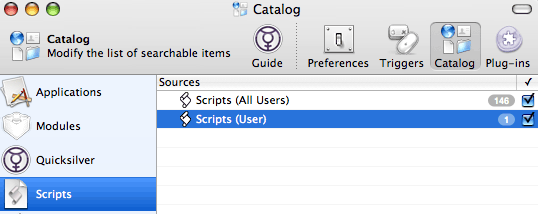
And added the Trigger from Quicksilver → Triggers... and assigned it to the hotkey ⌃ ⌥ ⌘ R.
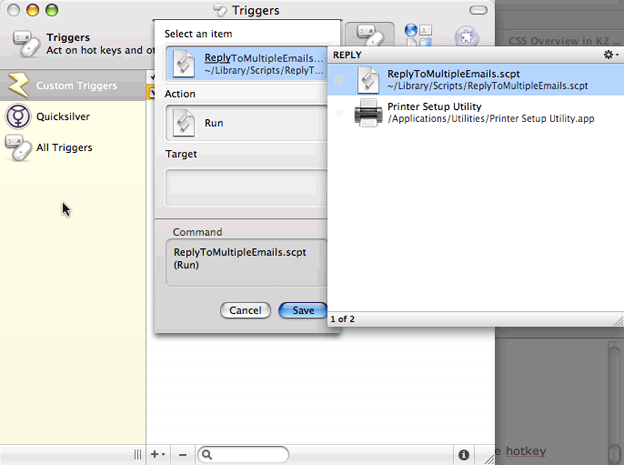
With this script in place, you can reply to multiple email messages in Mail by selecting them and hitting your chosen hotkey combination. So I'm off to email everyone who put the Singularity badge on their sites with an update.
Hope you find this useful... enjoy!
Update: I noticed that when you use this script to reply to multiple messages, the "was replied to" flag on the messages is not set. I've modified the script so that the flag is now set but be aware of an issue with this: If you use the script to create a new message and then don't send it, the "was replied to" flags on the messages you were replying to will remain set. If you don't like this behavior, remove the line that reads set the was replied to of (item i of the themessage) to true from the script.
Comments
by Aral on 2008-01-15 14:10:16
by Bill34d on 2008-01-20 16:54:08
by Marius van Zundert on 2008-01-15 13:11:02
by Jon on 2008-06-13 17:39:26
by Marius van Zundert on 2008-01-15 14:30:01
by Mathieu Christe on 2008-09-09 10:06:26
by BEDAVA SITEM on 2008-07-21 23:51:31
by Sean Schraeder on 2009-10-09 09:01:12
by svat on 2008-12-15 01:43:14
by Alex on 2009-05-25 15:06:47
by How to Get Six Pack Fast on 2009-04-15 13:59:07
by John Lein on 2009-11-13 02:16:20
by Mulder on 2009-07-26 17:21:50
by DartyX on 2009-11-27 17:00:20
by Chris Hillman on 2009-12-04 03:55:08
by Patrick on 2010-02-01 22:45:16
by Aral on 2010-02-05 13:38:41
by Mark Baldwin on 2010-03-27 01:44:36
by Bernie on 2010-09-09 12:42:37
by Mr Dabelina on 2010-06-24 19:04:51
by Esteban on 2010-11-30 19:09:38
by joanne bate on 2010-09-15 23:16:13
by Bernie on 2010-09-09 12:55:12
by joanne bate on 2010-09-15 23:19:02
by Richard Harriman on 2011-01-05 16:18:52
by Ray on 2010-12-21 17:08:33
by abe on 2011-03-31 17:53:28
by Wendy at Cloud9 Jive on 2012-01-12 17:39:23
by Josh on 2012-05-02 16:32:41
by Colin Mcknight on 2012-06-20 14:42:44
by Mike on 2012-08-08 22:20:28
by Rick on 2012-10-01 10:33:49
by Simon Wüthrich on 2012-09-26 14:35:25