
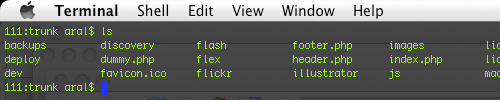
I'm sitting at the gate at LAX, waiting for my flight back to the UK and missing Visor, the Quake-like Terminal window that I loved using in Tiger and which stopped working in Leopard.
Google and ye shall find, as they say, so I did and it turned up a little gem: Instructions on how to get Visor working under Leopard.
Enjoy!
The How to get Visor working with Leopard article by Aral Balkan, unless otherwise expressly stated, is licensed under a Creative Commons Attribution-Noncommercial 2.0 UK: England License.
I’m no Mac user, anymore (haven’t been for about 6 years now), but it seems that OS X is going the way of Windows. I specifically refrain from upgrading to Vista, because moving to a version of Windows that’s so incompatible with previous versions and notably buggy, leads me to thinking I should opt for the free variety of OS as my primary development platform. Grant Davies is using Vista, now, and he complains about it regularly. If OS X is also going to force this route of change, I believe a revolution may be on the horizon.
Apple OS’s have usually required upgrades in the software ran on it. They are not as concerned with backwards compatability as they often expect software vendors to catch up because they see their OS as a major step forward (i.e. look at OS9 to OSX). Obviously this is less so with the Leopard upgrade as the majority of software still works.
I wonder if Apple worried so much about the backwards compatability their OS releases would slow down to MS pace and the features would dry up per release. I’d rather have Apple move the goal posts and force the developers to keep up. Keeps the platform having forward momentum and not stagnate.
But that only stretches so far. Some apps might provide a functionality you wouldn’t expect to be updated. Would you want to keep updating something you felt only had to be built once? I wrote a virtual drive app for windows a while back that’s been a real help in my development. If I had to keep updating that and all the other tools I’ve written every time Windows adds a major patch, I’d go insane!
What i was trying to say Lee is thats the way it has always been with Apples OS, so it’s extremly unlikely your going to see a revolution of people moving back to windows because of this. The revolution happening at the moment, is more and more people turning to mac.
lol… I definitely wouldn’t envisage a revolution of users migrating to Windows… I was thinking Linux
I installed the latest SIMBL to get visor running on Leopard, and it screwed all my global keyboard shortcuts (like F key for exposé and dashboard etc, and also broke the middle mouse button)
So, it’s not the perfect solution, I had to remove it, shame, cos I think visor is cool!
ok, i\ve found out it was some other software! ignore comment above
Actually, I’m wondering if this has something to do with TextMate not working properly. (And Leopard’s Terminal itself was giving me a SIMBL-related error and refusing to launch at one point.)
I’ve uninstalled VTerminal, Visor and SIMBL but the blogging bundle in TextMate started locking up when uploading images and getting categories.
Also, the OpaqueMenuBar app doesn’t work and they’re both creating files in /tmp (private/tmp/) so I wonder if the issues are related. (I checked the permissions on both the tmp symlink and the private/tmp/ folder and they’re fine (I recreated the symlink just to make sure).
I LOVE you for doing this! :-)
black tree came out with visor 1.5 specifically for leopard. i had the same issues you had with the regular terminal not working, but everything seems to be back to normal with this latest (still alpha) release.
http://code.google.com/p/blacktree-visor/
Hey Tim,
Thanks so much for the heads up — it’s working beautifully! Yay, I have my beloved Visor back! :)
[...] big thank-you to Tim Robles for alerting me to the Leopard release in the comments of my previous Visor-related [...]
Newbies, this is the link you need and remember to install SIMBL first, http://code.google.com/p/blacktree-visor/
Also, after the install, Terminal must be left running, you can close the open window. To configure Visor go to Terminal>Visor Preferences or you can do the same from Menu bar (Visor Status Menu bar Item)
Enjoy!
Kudos to the developer.